TP-Link AC1200 WiFi Router (Archer A54): How to Use Images
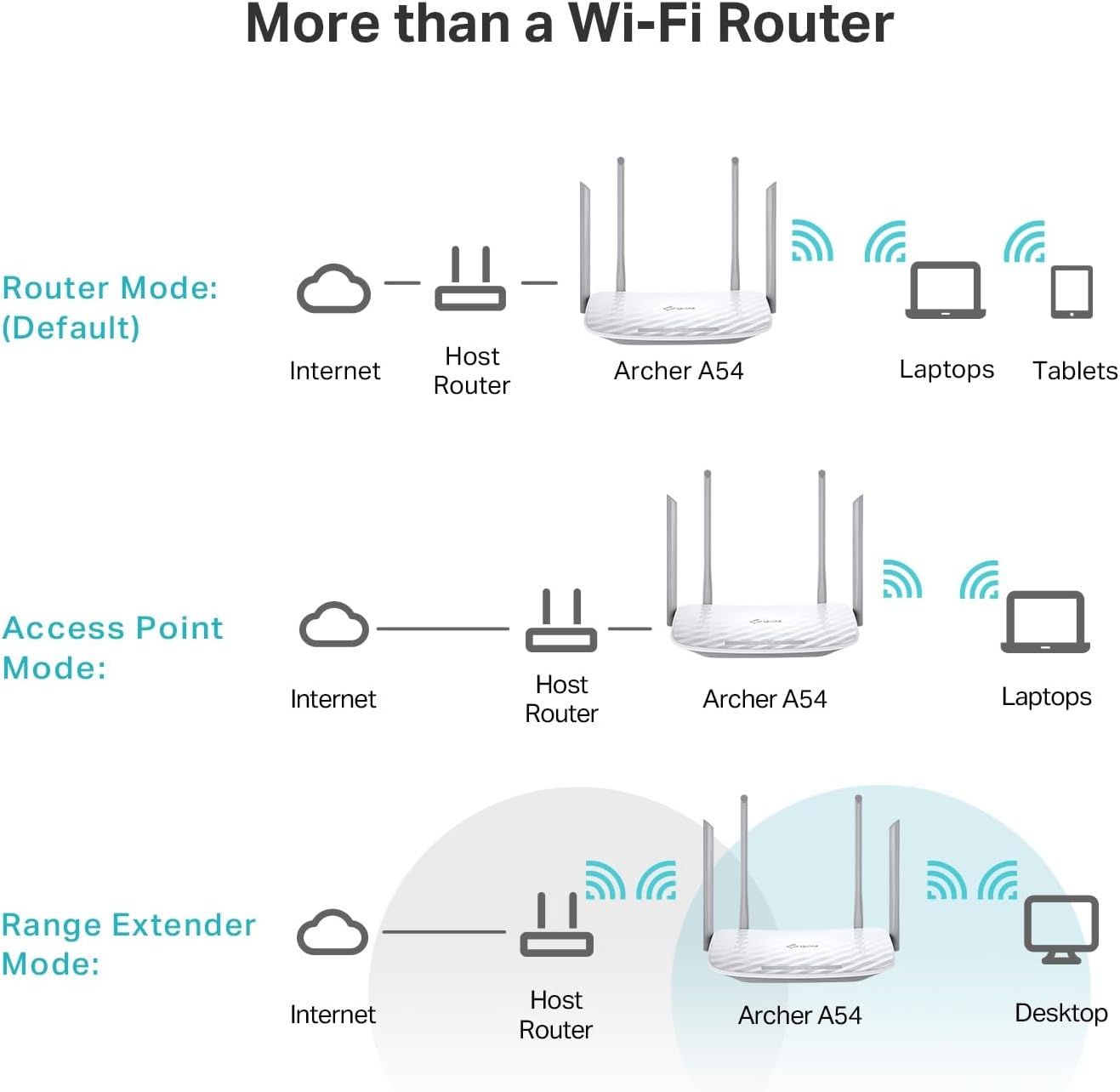
Demonstrates the three different operating modes and network configurations the Archer A54 router supports, showing shoppers the versatility and multiple use cases for the product. Explains how the router can be configured in different network topologies, helping shoppers understand setup options and how the device integrates into their existing network infrastructure.
- Brand
- TP-Link
- Category
- Electronics › Computers & Accessories › Networking Products › Routers
- Image type
- How to Use Images, Use Case Images, Secondary Images
- Design focus
- Router Mode; Access Point Mode; Range Extender Mode; Network Setup Configurations
- Listing position
- Image 7
- Marketplace
- United States
- Best Sellers Rank
- #593 in Electronics (See Top 100 in Electronics) #5 in Computer Routers
- Full listing
- See all 7 images in order
- ASIN
- B09G5Y1HWZ
See your listing next to your competitors
Paste your Amazon link. We score every image and show what the top sellers do differently. Your first comparison is free.
What this image does at a glance
- Score
- 15 / 100 · Unreadable small
- Headline
- More than a Wi-Fi Router
- Headline height
- 3.7% of the image
- Headline contrast
- Lc 97
- Text on the image
- 8.0% of the image, 24 blocks
- Blurred to tile size
- headline no longer readable
Listing bullet points
- Dual-band Wi-Fi with 5 GHz speeds up to 867 Mbps and 2.4 GHz speeds up to 300 Mbps, delivering 1200 Mbps of total bandwidth¹. Dual-band routers do not support 6 GHz. Performance varies by conditions, distance to devices, and obstacles such as walls.
- Covers up to 1,000 sq. ft. with four external antennas for stable wireless connections and optimal coverage.
- Supports IGMP Proxy/Snooping, Bridge and Tag VLAN to optimize IPTV streaming
- Access Point Mode - Supports AP Mode to transform your wired connection into wireless network, an ideal wireless router for home
- Advanced Security with WPA3 - The latest Wi-Fi security protocol, WPA3, brings new capabilities to improve cybersecurity in personal networks
- Easy network management at your fingertips with the TP-Link Tether app. Keep your WiFi performing at its best by keeping the firmware updated through the App. All Wi-Fi routers require a separate modem.
- Expand your WiFi Coverage with EasyMesh Compatibility - Easily create a Mesh network by pairing your router with any EasyMesh-compatible wifi router/range extender, providing seamless whole-home coverage.
- Works with all internet service providers, such as AT&T, Verizon, Xfinity, Spectrum, RCN, Cox, CenturyLink, Frontier, etc.(a modem is required for most internet service providers)
Similar how to use images in Electronics
 GEEKOM A7 Mini PC
 Sennehiser ACCENTUM Plus Wireless Headphones
 Sennehiser ACCENTUM Plus Wireless Headphones
 Sennehiser ACCENTUM Plus Wireless Headphones
 Sennheiser Consumer Audio Momentum 4 Wireless Headphones
 Sennheiser Consumer Audio Momentum 4 Wireless Headphones
 Sennheiser Consumer Audio Momentum 4 Wireless Headphones
 Sennehiser ACCENTUM Wireless Headphones
 Anker Adaptador hub USB-C
 Metal Switch Opener GPL 205G0 0.35oz
 Metal Switch Opener GPL 205G0 0.35oz
 RUNJRX
This image belongs to TP-Link and is shown for design research. Request removal.