TP-Link USB to Ethernet Adapter (UE306): How to Use Images
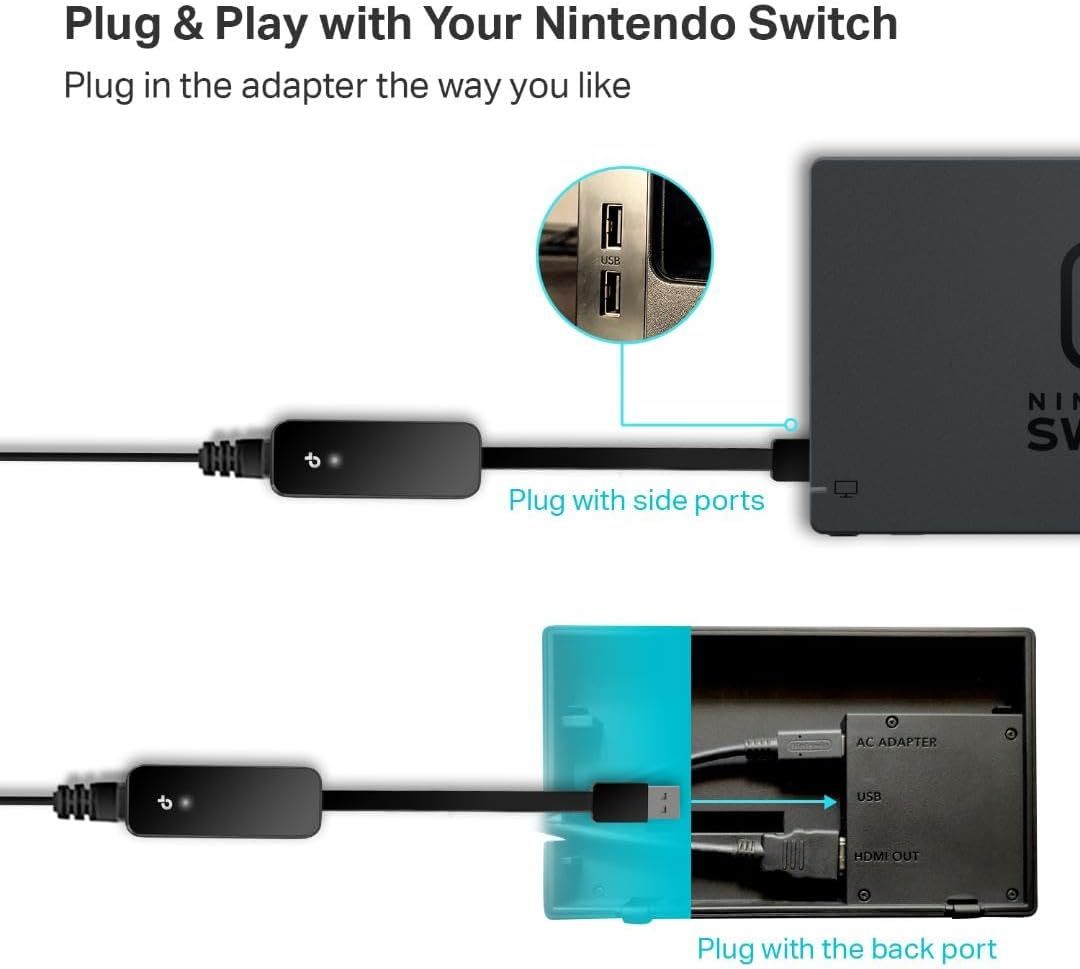
Demonstrates two different ways to connect the adapter to the Nintendo Switch, showing shoppers the product's ease of use and flexible installation options. Shows the product can be used in multiple configurations with the Nintendo Switch, highlighting versatility in how the adapter can be connected.
- Brand
- TP-Link
- Category
- Electronics › Computers & Accessories › Networking Products › Network Adapters › Laptop Network Adapters
- Image type
- How to Use Images, Use Case Images, Secondary Images
- Design focus
- Plug & Play Installation; Flexible Connection Options; Multiple Connection Methods; Side Port and Back Port Compatibility
- Listing position
- Image 5
- Marketplace
- United States
- Best Sellers Rank
- #28 in Video Games (See Top 100 in Video Games) #1 in Nintendo Switch Cables & Adapters #1 in Laptop Network Adapters
- ASIN
- B09GRL3VCN
See your listing next to your competitors
Paste your Amazon link. We score every image and show what the top sellers do differently. Your first comparison is free.
What this image does at a glance
- Score
- 0 / 100 · Unreadable small
- Headline
- SI
- Headline height
- 3.2% of the image
- Headline contrast
- Lc 8
- Text on the image
- 8.5% of the image, 9 blocks
- Blurred to tile size
- headline no longer readable
Listing bullet points
- 𝐇𝐢𝐠𝐡-𝐒𝐩𝐞𝐞𝐝 𝐔𝐒𝐁 𝐄𝐭𝐡𝐞𝐫𝐧𝐞𝐭 𝐀𝐝𝐚𝐩𝐭𝐞𝐫 - UE306 is a USB 3.0 Type-A to RJ45 Ethernet adapter that adds a reliable wired network port to your laptop, tablet, or Ultrabook. It delivers fast and stable 10/100/1000 Mbps wired connections to your computer or tablet via a router or…
- 𝐔𝐒𝐁 𝟑.𝟎 𝐟𝐨𝐫 𝐅𝐚𝐬𝐭𝐞𝐫, 𝐌𝐨𝐫𝐞 𝐒𝐭𝐚𝐛𝐥𝐞 𝐃𝐚𝐭𝐚 𝐓𝐫𝐚𝐧𝐬𝐟𝐞𝐫𝐬- Powered via USB 3.0, this adapter provides high-speed Gigabit Ethernet without the need for external power(10/100/1000Mbps). Backward compatible with USB 2.0/1.1, it ensures reliable performance across a wide…
- 𝐒𝐮𝐩𝐩𝐨𝐫𝐭𝐬 𝐍𝐢𝐧𝐭𝐞𝐧𝐝𝐨 𝐒𝐰𝐢𝐭𝐜𝐡- Easily connect your Nintendo Switch to a wired network for faster downloads and a more stable online gaming experience compared to Wi-Fi.
- 𝐏𝐥𝐮𝐠 𝐚𝐧𝐝 𝐏𝐥𝐚𝐲- No driver required for Nintendo Switch, Windows 11/10/8.1/8, and Linux. Simply connect and enjoy instant wired internet access without complicated setup.
- 𝐁𝐫𝐨𝐚𝐝 𝐃𝐞𝐯𝐢𝐜𝐞 𝐂𝐨𝐦𝐩𝐚𝐭𝐢𝐛𝐢𝐥𝐢𝐭𝐲- Supports Nintendo Switch, PCs, laptops, Ultrabooks, tablets, and other USB-powered web devices; works with network equipment including modems, routers, and switches.
- 𝐔𝐥𝐭𝐫𝐚-𝐂𝐨𝐦𝐩𝐚𝐜𝐭 𝐚𝐧𝐝 𝐅𝐨𝐥𝐝𝐚𝐛𝐥𝐞 𝐃𝐞𝐬𝐢𝐠𝐧- At just 2.8 x 1.0 x 0.6 inches, the UE306 easily fits into your laptop bag, backpack, or pocket. Its lightweight build and foldable USB connector make it perfect for travel, gaming on Nintendo Switch, or quick wired setups anywhere.
- 𝐎𝐮𝐫 𝐂𝐲𝐛𝐞𝐫𝐬𝐞𝐜𝐮𝐫𝐢𝐭𝐲 𝐂𝐨𝐦𝐦𝐢𝐭𝐦𝐞𝐧𝐭 - TP-Link is a signatory of the U.S. Cybersecurity and Infrastructure Security Agency’s (CISA) Secure-by-Design pledge. This device is designed, built, and maintained, with advanced security as a core requirement.
- 𝐑𝐞𝐩𝐥𝐚𝐜𝐞 𝐚 𝐁𝐫𝐨𝐤𝐞𝐧 𝐄𝐭𝐡𝐞𝐫𝐧𝐞𝐭 𝐏𝐨𝐫𝐭 - A convenient solution for laptops or tablets without a built-in RJ45 port, ensuring fast and stable connectivity wherever you go.
Similar how to use images in Electronics
 GEEKOM A7 Mini PC
 Sennehiser ACCENTUM Plus Wireless Headphones
 Sennehiser ACCENTUM Plus Wireless Headphones
 Sennehiser ACCENTUM Plus Wireless Headphones
 Sennheiser Consumer Audio Momentum 4 Wireless Headphones
 Sennheiser Consumer Audio Momentum 4 Wireless Headphones
 Sennheiser Consumer Audio Momentum 4 Wireless Headphones
 Sennehiser ACCENTUM Wireless Headphones
 Anker Adaptador hub USB-C
 Metal Switch Opener GPL 205G0 0.35oz
 Metal Switch Opener GPL 205G0 0.35oz
 RUNJRX
This image belongs to TP-Link and is shown for design research. Request removal.