13 in 1 USB C Docking Station: How to Use Images
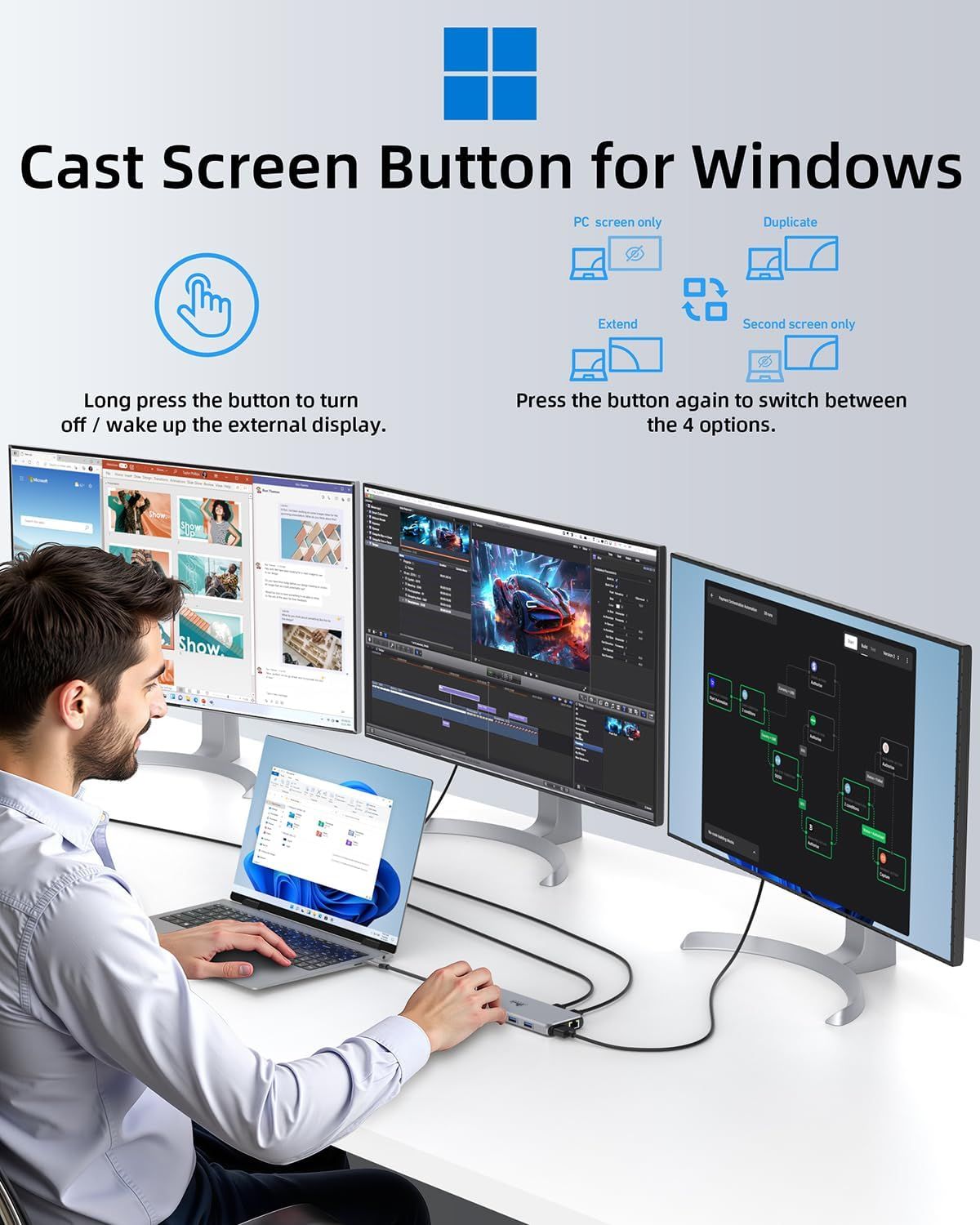
Instructs users on how to use the cast screen button to control external displays on Windows, including turning on/off displays and switching between four display modes (PC screen only, Duplicate, Extend, Second screen only). Demonstrates the product's versatility in supporting multiple professional use cases including design work, video editing, and complex multi-screen workflows.
- Brand
- LIONWEI
- Category
- Electronics › Computers & Accessories › Computer Accessories & Peripherals › USB Hubs
- Image type
- How to Use Images, Use Case Images, Secondary Images
- Design focus
- Cast Screen Button for Windows; Display Mode Switching; Multi-Monitor Setup; Professional Workflows
- Listing position
- Image 8
- Marketplace
- United States
- Best Sellers Rank
- #9 in Laptop Docking Stations #25 in USB Hubs
- Full listing
- See all 9 images in order
- ASIN
- B0BNTHWWMY
See your listing next to your competitors
Paste your Amazon link. We score every image and show what the top sellers do differently. Your first comparison is free.
What this image does at a glance
- Score
- 72 / 100 · Readable
- Headline
- Cast Screen Button for Windows
- Headline height
- 3.5% of the image
- Headline contrast
- Lc 84
- Text on the image
- 6.3% of the image, 9 blocks
- Blurred to tile size
- headline still readable
Listing bullet points
- 【13 in 1 Laptop Docking Station】Plug and play. With this usb c hub multiple adapter, you get 2*4K HDMI, DisplayPort, 2*USB C ports(Both support 100W Power Delivery+10Gbps Data Transfer), USB 3.1(10Gbps), 3*USB 3.0, 2*USB 2.0, 3.5mm Audio, Gigabit Ethernet port.
- 【Triple Display Docking Station】This usb c docking station only Windows System support MST and SST(Mirror & Extend Mode), HDMI port support up to 4K@60Hz (DP1.4 Source); DP port support up to 4K@60Hz. ❣️Note: For Extend mode, MAC OS can Only Extend One Monitor (4K@60Hz).
- 【Fast Data Transfer & PD Charging Port】USB-C 3.1 No longer distinguish between data transmission and fast charging port, fulfill the 10Gb/s high speed rates data transfer at the same time. And this computer docking station with power delivery support 100W PD Charging (This docking station will…
- 【Gigabit Ethernet & Audio/Mic】 Docking station ethernet port download movies quickly and reduce game lag. This laptop docking station with 3.5mm Audio/Mic 2-in-1 jack.
- 【18 Month Warranty】LIONWEI support 18 month product warranty, If you encounter any problems in use, please feel free to message us.
Similar how to use images in Electronics
 GEEKOM A7 Mini PC
 Sennehiser ACCENTUM Plus Wireless Headphones
 Sennehiser ACCENTUM Plus Wireless Headphones
 Sennehiser ACCENTUM Plus Wireless Headphones
 Sennheiser Consumer Audio Momentum 4 Wireless Headphones
 Sennheiser Consumer Audio Momentum 4 Wireless Headphones
 Sennheiser Consumer Audio Momentum 4 Wireless Headphones
 Sennehiser ACCENTUM Wireless Headphones
 Anker Adaptador hub USB-C
 Metal Switch Opener GPL 205G0 0.35oz
 Metal Switch Opener GPL 205G0 0.35oz
 RUNJRX
This image belongs to LIONWEI and is shown for design research. Request removal.