TP-Link 8 Port Gigabit Switch: How to Use Images
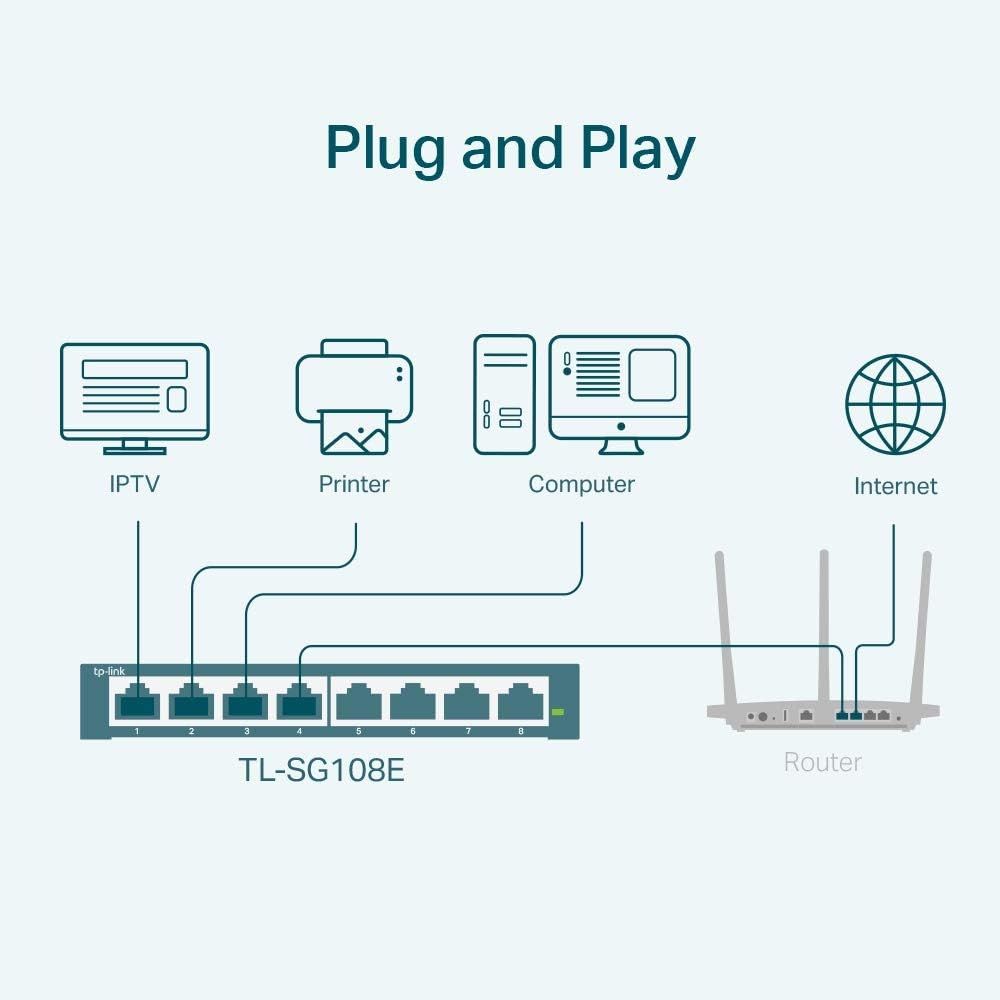
Demonstrates how to connect multiple devices (IPTV, printer, computer) to the network switch and router, emphasizing the plug-and-play ease of setup. Shows the variety of devices that can be connected to the network switch, highlighting its versatility for home or office networking needs.
- Brand
- TP-Link
- Category
- Electronics › Computers & Accessories › Networking Products › Switches
- Image type
- How to Use Images, Use Case Images, Secondary Images
- Design focus
- Easy Setup; Network Configuration; Device Compatibility; Multiple Use Cases
- Listing position
- Image 2
- Marketplace
- United States
- Best Sellers Rank
- #1 in Computer Networking Switches
- Full listing
- See all 10 images in order
- ASIN
- B00K4DS5KU
See your listing next to your competitors
Paste your Amazon link. We score every image and show what the top sellers do differently. Your first comparison is free.
What this image does at a glance
- Score
- 70 / 100 · Readable
- Headline
- Plug and Play
- Headline height
- 5.4% of the image
- Headline contrast
- Lc 84
- Text on the image
- 3.6% of the image, 7 blocks
- Blurred to tile size
- headline still readable
Listing bullet points
- 𝟴 𝗚𝗶𝗴𝗮𝗯𝗶𝘁 𝗘𝘁𝗵𝗲𝗿𝗻𝗲𝘁 𝗣𝗼𝗿𝘁𝘀: expand your network with 8 high-speed ethernet ports
- 𝗘𝗮𝘀𝘆 𝗦𝗺𝗮𝗿𝘁 𝗠𝗮𝗻𝗮𝗴𝗲𝗺𝗲𝗻𝘁: Manage and configure your network effortlessly via a web interface/free software
- 𝗦𝘂𝗽𝗽𝗼𝗿𝘁 𝗩𝗟𝗔𝗡: Segment traffic with up to 32 VLANs simultaneously (out of 4K VLAN IDs) for better security
- 𝗡𝗲𝘁𝘄𝗼𝗿𝗸 𝗠𝗼𝗻𝗶𝘁𝗼𝗿𝗶𝗻𝗴: Monitor your network effectively with port mirroring, loop prevention, and cable diagnostics
- 𝗜𝗚𝗠𝗣 𝗦𝗻𝗼𝗼𝗽𝗶𝗻𝗴: Enhances multicast application performance
- 𝗦𝘂𝗽𝗽𝗼𝗿𝘁 𝗤𝗼𝗦: Optimize traffic flow for various applications
- 𝗟𝗮𝘆𝗲𝗿 𝟮 𝗙𝗲𝗮𝘁𝘂𝗿𝗲𝘀: Enhance network efficiency and security with features like Link Aggregation, Port Mirroring, IGMP Snooping, and Loop Prevention
- 𝗙𝗹𝗲𝘅𝗶𝗯𝗹𝗲 𝗜𝗻𝘀𝘁𝗮𝗹𝗹𝗮𝘁𝗶𝗼𝗻: Suitable for desktop or wall mount
Similar how to use images in Electronics
 GEEKOM A7 Mini PC
 Sennehiser ACCENTUM Plus Wireless Headphones
 Sennehiser ACCENTUM Plus Wireless Headphones
 Sennehiser ACCENTUM Plus Wireless Headphones
 Sennheiser Consumer Audio Momentum 4 Wireless Headphones
 Sennheiser Consumer Audio Momentum 4 Wireless Headphones
 Sennheiser Consumer Audio Momentum 4 Wireless Headphones
 Sennehiser ACCENTUM Wireless Headphones
 Anker Adaptador hub USB-C
 Metal Switch Opener GPL 205G0 0.35oz
 Metal Switch Opener GPL 205G0 0.35oz
 RUNJRX
This image belongs to TP-Link and is shown for design research. Request removal.