XPPen Drawing Tablet with Screen Full-Laminated Graphics Drawing Monitor Artist13.3 Pro…: How to Use Images
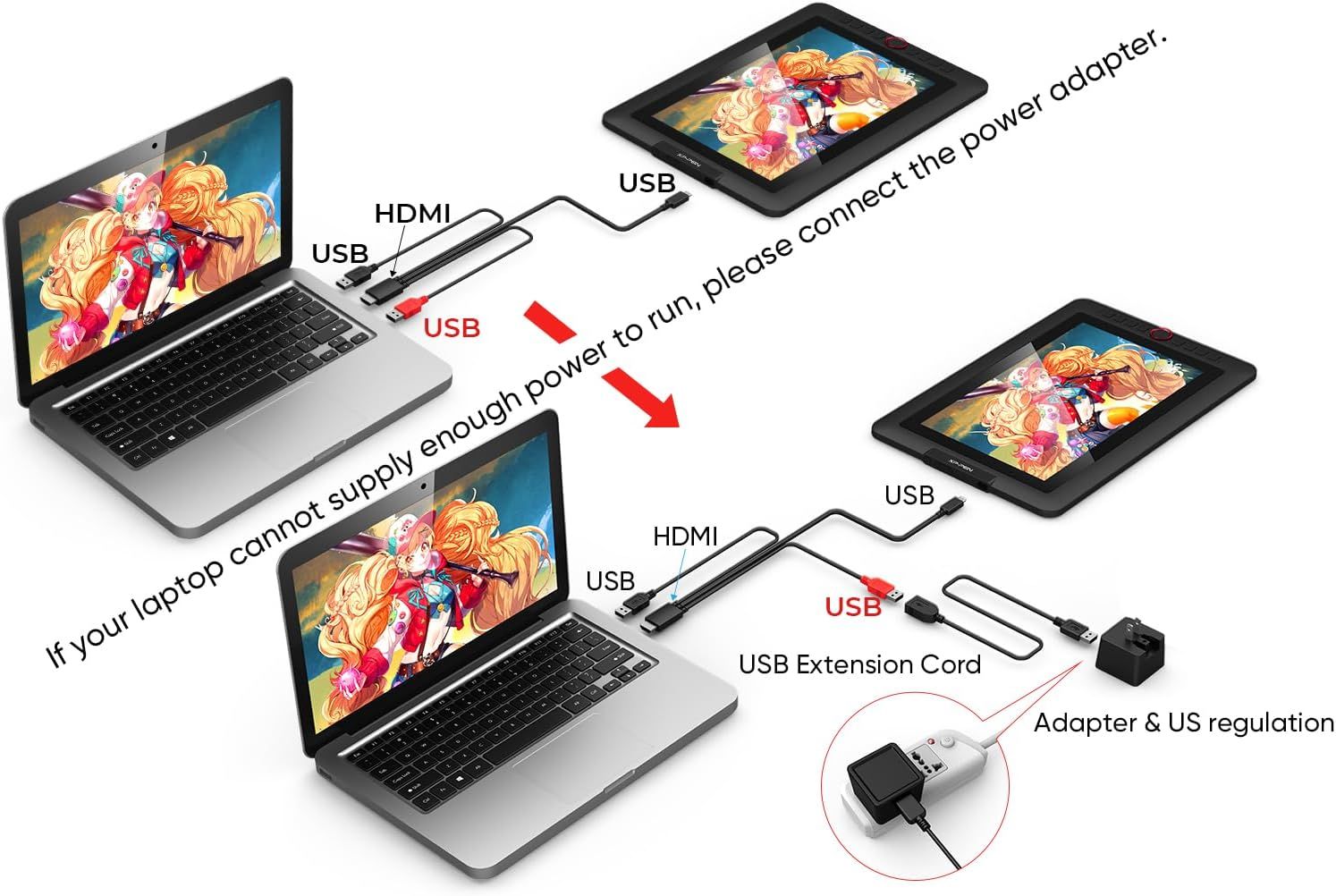
Demonstrates two different setup methods for connecting the drawing tablet to a laptop, showing how to properly power the device depending on the laptop's power output capability.
- Brand
- XP-Pen
- Category
- Electronics › Computers & Accessories › Computer Accessories & Peripherals › Input Devices › Graphics Tablets
- Image type
- How to Use Images, Secondary Images
- Design focus
- Setup Instructions; Power Connection
- Listing position
- Image 4
- Marketplace
- United States
- Best Sellers Rank
- #9 in Computer Graphics Tablets
- Full listing
- See all 9 images in order
- ASIN
- B07VPHR6GD
See your listing next to your competitors
Paste your Amazon link. We score every image and show what the top sellers do differently. Your first comparison is free.
What this image does at a glance
- Score
- 53 / 100 · Hard to read small
- Headline
- If your laptop cannot supply enough power to run, please con
- Headline height
- 73.7% of the image
- Headline contrast
- Lc 87
- Text on the image
- 67.3% of the image, 11 blocks
- Blurred to tile size
- headline no longer readable
Listing bullet points
- PLEASE NOTE:XPPen Artist13.3 Pro drawing tablet Need to connect with computer,you need to use it with your computer or laptop, the 3 in 1 cable is included
- Drawing Tablet with Screen: Tilt Function- XPPen Artist 13.3 Pro supports up to 60 degrees of tilt function, so now you don't need to adjust the brush direction in the software again and again. Simply tilt to add shading to your creation and enjoy smoother and more natural transitions between…
- Graphics Tablets: High Color Gamut- The 13.3 inch fully-laminated FHD Display pairs a superb color accuracy of 88% NTSC (Adobe RGB≧91%,sRGB≧123%) with a 178-degree viewing angle and delivers rich colors, vivid images, and dazzling details in a wider view. Your creative world is now as powerful as…
- Drawing Pad: One is enough- The sleek Red Dial on the display is expertly designed with creators in mind, its strategic placement allows for natural drawing postures. With just one wheel, you can effortlessly zoom in and out, adjust brush sizes, and flip the canvas—all tailored to suit the habits…
- Universal Compatibility & Software Support:supports Windows 7 (or later), Mac OS X 10.10 (or later), Chrome OS 88 (or later), and Linux systems. Fully compatible with major creative software including Photoshop, Illustrator, SAI, and Blender 3D. Register your device to access additional programs…
- Drawing Tablet: Fully-laminated Screen- The Artist 13.3 Pro seamlessly combines the glass and screen, to create a distraction-less working environment, virtually no parallax
- Drawing Display: Battery-free stylus- Comes with a multifunctional pen case that serves as both a stand and holder, 8 durable replacement nibs, and this stylus ergonomic design for comfort during long sessions. It features two customizable shortcut keys for workflow efficiency and a battery-free…
Similar how to use images in Electronics
 GEEKOM A7 Mini PC
 Sennehiser ACCENTUM Plus Wireless Headphones
 Sennehiser ACCENTUM Plus Wireless Headphones
 Sennehiser ACCENTUM Plus Wireless Headphones
 Sennheiser Consumer Audio Momentum 4 Wireless Headphones
 Sennheiser Consumer Audio Momentum 4 Wireless Headphones
 Sennheiser Consumer Audio Momentum 4 Wireless Headphones
 Sennehiser ACCENTUM Wireless Headphones
 Anker Adaptador hub USB-C
 Metal Switch Opener GPL 205G0 0.35oz
 Metal Switch Opener GPL 205G0 0.35oz
 RUNJRX
This image belongs to XP-Pen and is shown for design research. Request removal.