Webcam Cover (3 Pack): How to Use Images
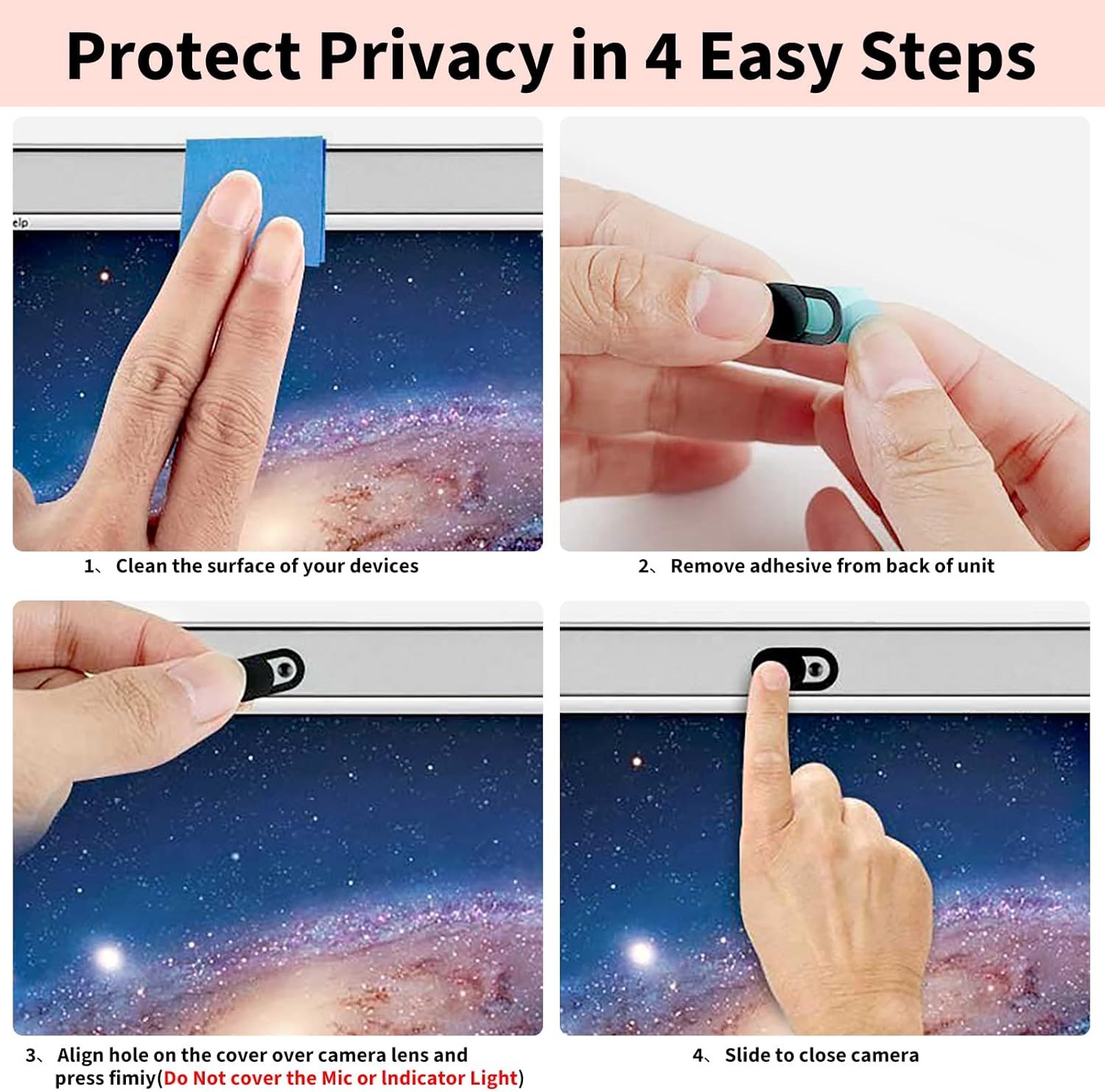
Demonstrates the simple 4-step installation process for a webcam privacy cover, reassuring shoppers that protecting their privacy is quick and straightforward.
- Brand
- Yilador
- Category
- Electronics › Computers & Accessories › Laptop Accessories › Camera Privacy Covers
- Image type
- How to Use Images, Secondary Images
- Design focus
- Easy Installation; Privacy Protection
- Listing position
- Image 5
- Marketplace
- United States
- Best Sellers Rank
- #2 in Camera Privacy Covers
- ASIN
- B07TBG7WM9
See your listing next to your competitors
Paste your Amazon link. We score every image and show what the top sellers do differently. Your first comparison is free.
What this image does at a glance
- Score
- 72 / 100 · Readable
- Headline
- Protect Privacy in 4 Easy Steps
- Headline height
- 4.4% of the image
- Headline contrast
- Lc 91
- Text on the image
- 8.7% of the image, 7 blocks
- Blurred to tile size
- headline still readable
Listing bullet points
- Note: Not suitable for MacBooks released after 2023 or devices with a protruding front camera; Not applicable to full-screen or notch-style tempered glass screen protectors; Do not use on the rear camera of the phone.
- 💻 Why Do You Need a Webcam Cover Slide? — Safeguard your privacy by covering your webcam with our reliable webcam cover when not in use. Don't let anyone secretly watch you. Stay protected!
- ✅ Thin & Stylish — Enhance your laptop's functionality and aesthetics with our 0.027" ultra-thin webcam covers. Seamlessly close your laptop while adding a touch of sophistication.
- ✅ Fits Most Devices — Compatible with laptops, phones, tablets, desktops! Keep your privacy intact on Ap/ple, Mac/Book, iPh/one, iP/ad, H/P, L/novo, De/ll, Ac/er, As/us, Sa/msung devices.
- ✅ 365 Days Protection — Our upgraded 3.0 adhesive ensures a strong hold that won't damage your equipment. Experience reliable, long-term privacy protection day in and day out.
- ✅ Easy to Use — Simplify your privacy protection with 4 easy steps—clean, apply adhesive, align with the camera lens, press for 10 seconds, and slide to close. Note: Not suitable for full-screen or notched tempered film devices.
Similar how to use images in Electronics
 GEEKOM A7 Mini PC
 Sennehiser ACCENTUM Plus Wireless Headphones
 Sennehiser ACCENTUM Plus Wireless Headphones
 Sennehiser ACCENTUM Plus Wireless Headphones
 Sennheiser Consumer Audio Momentum 4 Wireless Headphones
 Sennheiser Consumer Audio Momentum 4 Wireless Headphones
 Sennheiser Consumer Audio Momentum 4 Wireless Headphones
 Sennehiser ACCENTUM Wireless Headphones
 Anker Adaptador hub USB-C
 Metal Switch Opener GPL 205G0 0.35oz
 Metal Switch Opener GPL 205G0 0.35oz
 RUNJRX
This image belongs to Yilador and is shown for design research. Request removal.