KeiBn Laptop Cooling Pad: How to Use Images
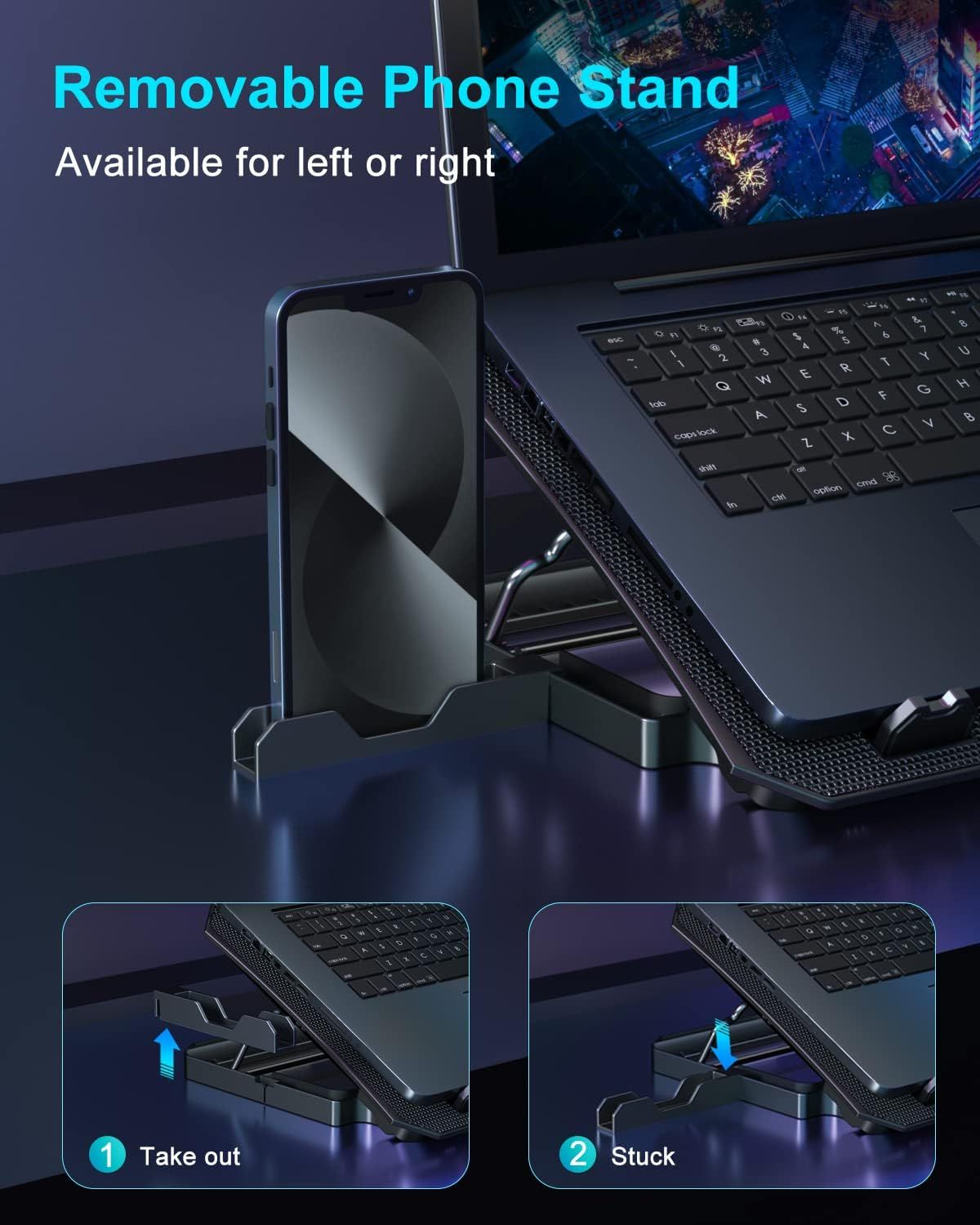
Demonstrates how to install and use the removable phone stand feature, showing the two-step process of taking out and attaching the stand to reassure shoppers of its ease of use. Highlights the product's removable phone stand feature that can be positioned on either side, emphasizing convenience and flexibility for users.
- Brand
- KeiBn
- Category
- Electronics › Computers & Accessories › Laptop Accessories › Cooling Pads & External Fans › Cooling Pads
- Image type
- How to Use Images, Single Benefit Images, Secondary Images
- Design focus
- Removable Phone Stand Installation; Removable Phone Stand; Versatile Positioning
- Listing position
- Image 5
- Marketplace
- United States
- Best Sellers Rank
- #1,680 in Electronics (See Top 100 in Electronics) #6 in Laptop Cooling Pads
- Full listing
- See all 7 images in order
- ASIN
- B0B5QT3197
See your listing next to your competitors
Paste your Amazon link. We score every image and show what the top sellers do differently. Your first comparison is free.
What this image does at a glance
- Score
- 25 / 100 · Unreadable small
- Headline
- Removable Phone Stand
- Headline height
- 3.6% of the image
- Headline contrast
- Lc 65
- Text on the image
- 5.0% of the image, 6 blocks
- Blurred to tile size
- headline no longer readable
- lower text "Removable Phone Stand" is 2.5% of height, needs 5.5%
- headline unreadable at phone-tile blur
Listing bullet points
- 【Efficient Heat Dissipation】KeiBn Laptop Cooling Pad is with two strong fans and metal mesh provides airflow to keep your laptop cool quickly and avoids overheating during long time using.
- 【Ergonomic Height Stands】Five adjustable heights desigen to put the stand up or flat and hold your laptop in a suitable position. Two baffle prevents your laptop from sliding down or falling off; It's not just a laptop Cooling Pad, but also a perfect laptop stand.
- 【Phone Stand on Side】A hideable mobile phone holder that can be used on both sides releases your hand. Blue LED indicator helps to notice the active status of the cooling pad.
- 【2 USB 2.0 ports】Two USB ports on the back of the laptop cooler. The package contains a USB cable for connecting to a laptop, and another USB port for connecting other devices such as keyboard, mouse, u disk, etc.
- 【Universal Compatibility】The light and portable laptop cooling pad works with most laptops up to 15.6 inch. Meet your needs when using laptop home or office for work.
Similar how to use images in Electronics
 GEEKOM A7 Mini PC
 Sennehiser ACCENTUM Plus Wireless Headphones
 Sennehiser ACCENTUM Plus Wireless Headphones
 Sennehiser ACCENTUM Plus Wireless Headphones
 Sennheiser Consumer Audio Momentum 4 Wireless Headphones
 Sennheiser Consumer Audio Momentum 4 Wireless Headphones
 Sennheiser Consumer Audio Momentum 4 Wireless Headphones
 Sennehiser ACCENTUM Wireless Headphones
 Anker Adaptador hub USB-C
 Metal Switch Opener GPL 205G0 0.35oz
 Metal Switch Opener GPL 205G0 0.35oz
 RUNJRX
This image belongs to KeiBn and is shown for design research. Request removal.