HUANUO FlowLift™ Dual Monitor Stand: How to Use Images
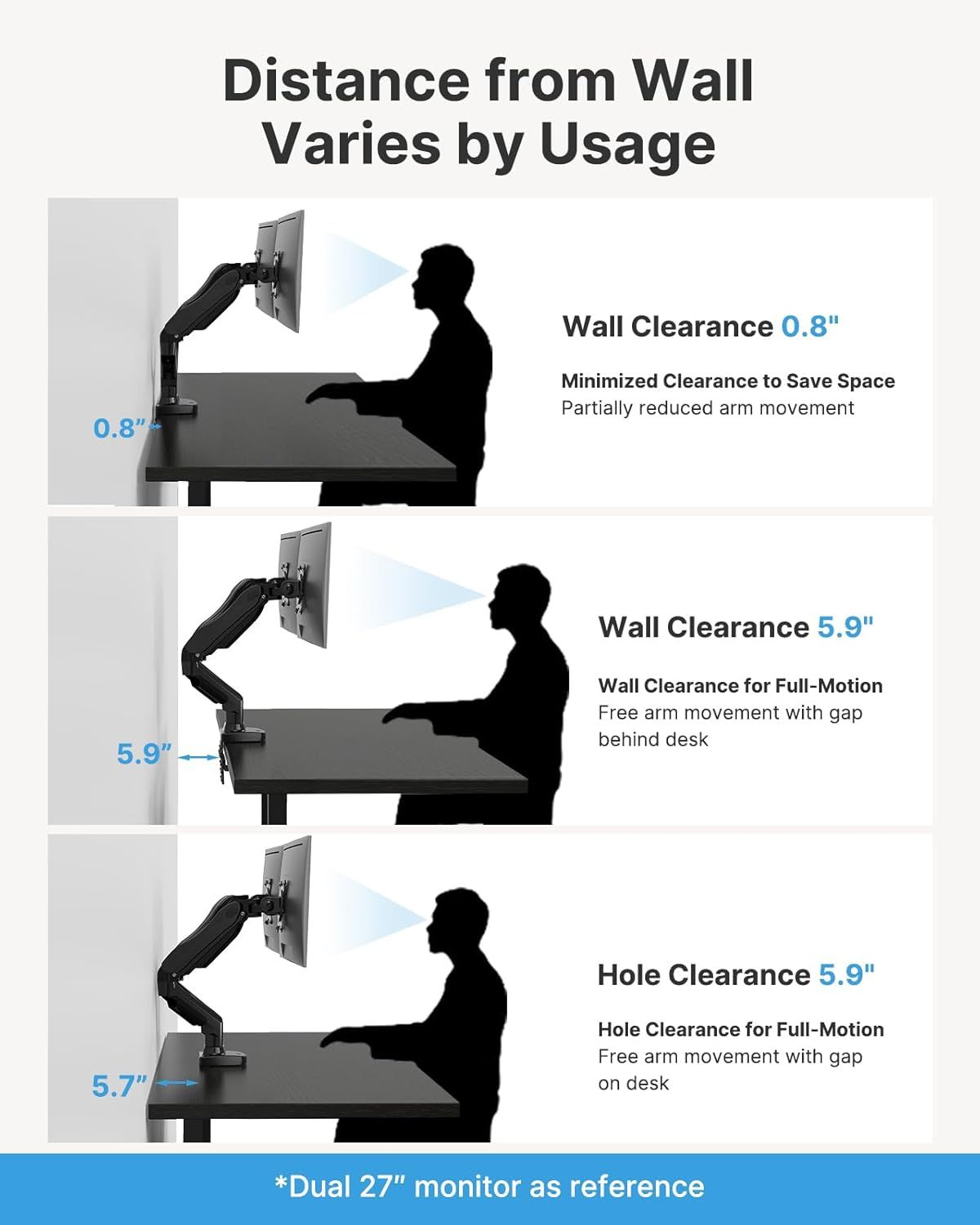
Demonstrates the adjustable wall clearance distances of the monitor arm in different configurations, helping shoppers understand space-saving flexibility and installation requirements. Shows three different setup configurations to educate shoppers on how to position the monitor arm based on their desk space and movement needs.
- Brand
- HUANUO
- Category
- Electronics › Computers & Accessories › Computer Accessories & Peripherals › Monitor Accessories › Monitor Arms
- Image type
- How to Use Images, Dimension Images, Secondary Images
- Design focus
- Wall Clearance Measurements; Adjustable Distance; Setup Configurations; Usage Scenarios
- Listing position
- Image 9
- Marketplace
- United States
- Best Sellers Rank
- #1 in Computer Monitor Arms
- Full listing
- See all 9 images in order
- ASIN
- B07T5SY43L
See your listing next to your competitors
Paste your Amazon link. We score every image and show what the top sellers do differently. Your first comparison is free.
What this image does at a glance
- Score
- 15 / 100 · Unreadable small
- Headline
- Distance from Wall
- Headline height
- 3.5% of the image
- Headline contrast
- Lc 93
- Text on the image
- 11.4% of the image, 17 blocks
- Blurred to tile size
- headline no longer readable
Listing bullet points
- Compatible with Wide Screens - To ensure compatibility with the dual monitor mount, your each monitor must meet three conditions at the same time: First, computer screens size range: 13 to 32 inches. Second, screen weight range: 4.4 to 19.8 lbs. Third, the back of the monitor screen must have VESA…
- Regarding the compatibility with desks - Your desk must meet three conditions at the same time: First, desk material: Only wooden desks are recommended, plastic or glass desks cannot be used. Second, desk thickness range: 0.59" - 3.54". Third, the bottom of the desk should not have any cross beams…
- Dual C-Clamp Hold - Worried your dual monitors might wobble or slip? Our upgraded base uses a larger platform plus a dual C-clamp structure to lock the dual monitor arm firmly to your desk. Each arm safely keeps your screens steady while you type, click and game—no shaking, no sliding, just a…
- Full-Motion Adjustment For Comfortable View - Pull the screen closer when you’re deep in a spreadsheet, push it back to watch videos, or rotate to portrait for coding — moving everything smoothly with just one hand. The monitor stand offers +85°/-50° tilt, ±90° swivel and 360° rotation. Raise your…
- Keep Your Desk Organized: By lifting both screens off the desktop, this dual monitor stand opens up valuable space for your keyboard, notebook, docking station or a simple, clutter-free work area. Built-in cable management guides wires along the arms, keeping cords out of sight and out of the way.…
Similar how to use images in Electronics
 GEEKOM A7 Mini PC
 Sennehiser ACCENTUM Plus Wireless Headphones
 Sennehiser ACCENTUM Plus Wireless Headphones
 Sennehiser ACCENTUM Plus Wireless Headphones
 Sennheiser Consumer Audio Momentum 4 Wireless Headphones
 Sennheiser Consumer Audio Momentum 4 Wireless Headphones
 Sennheiser Consumer Audio Momentum 4 Wireless Headphones
 Sennehiser ACCENTUM Wireless Headphones
 Anker Adaptador hub USB-C
 Metal Switch Opener GPL 205G0 0.35oz
 Metal Switch Opener GPL 205G0 0.35oz
 RUNJRX
This image belongs to HUANUO and is shown for design research. Request removal.