OPNICE Desk Organizer and Accessories: How to Use Images
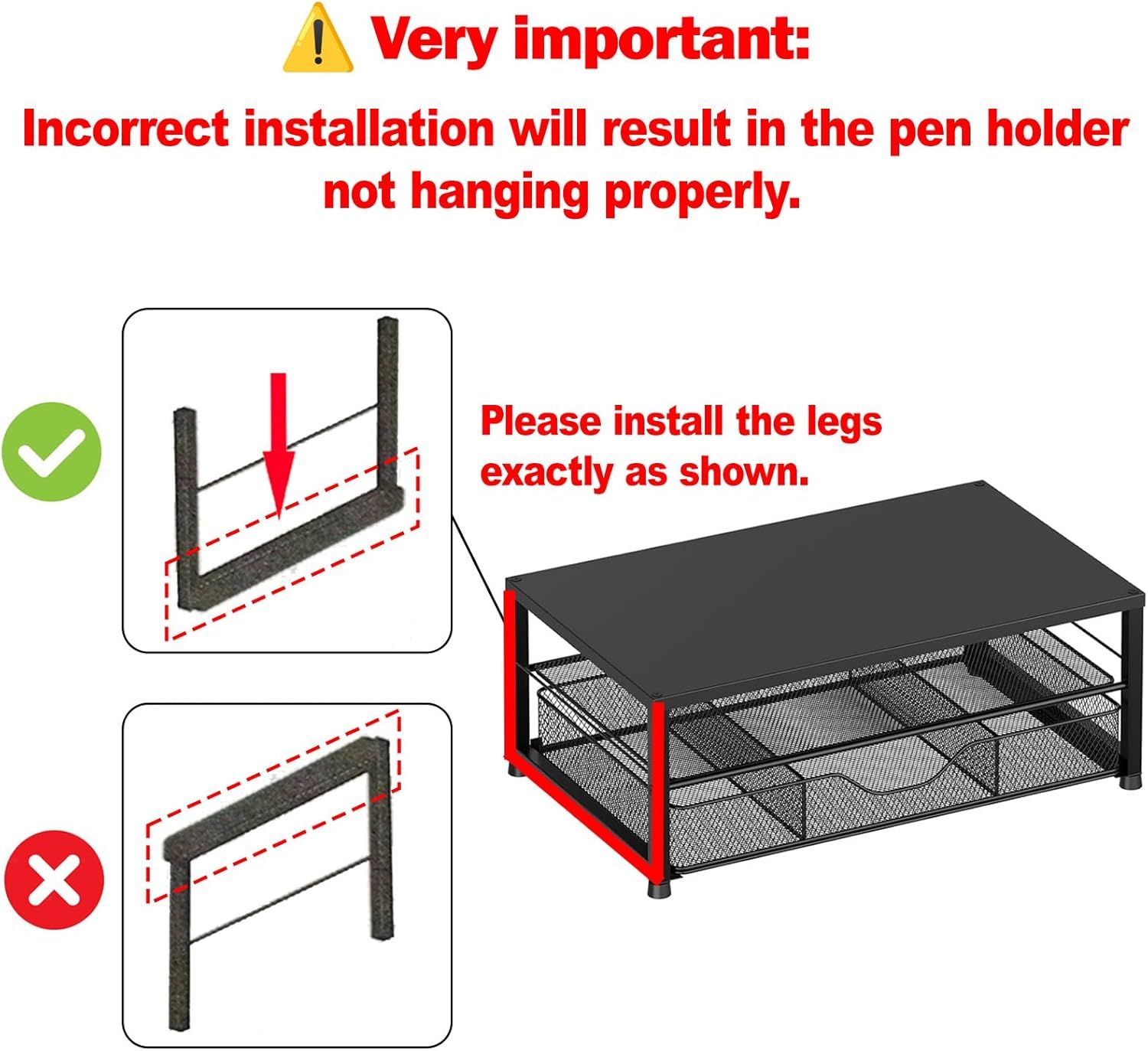
Instructs the shopper on the correct way to install the legs of the pen holder to ensure proper hanging and functionality.
- Brand
- OPNICE
- Category
- Electronics › Computers & Accessories › Computer Accessories & Peripherals › Monitor Accessories › Monitor Stands
- Image type
- How to Use Images, Secondary Images
- Design focus
- Correct Installation Instructions
- Listing position
- Image 9
- Marketplace
- United States
- Best Sellers Rank
- #2 in Computer Monitor Stands
- Full listing
- See all 9 images in order
- ASIN
- B0DB8F7GDN
See your listing next to your competitors
Paste your Amazon link. We score every image and show what the top sellers do differently. Your first comparison is free.
What this image does at a glance
- Score
- 14 / 100 · Unreadable small
- Headline
- !
- Headline height
- 5.7% of the image
- Headline contrast
- Lc 25
- Text on the image
- 12.4% of the image, 6 blocks
- Blurred to tile size
- headline no longer readable
Listing bullet points
- 【Ergonomic Design】:OPNICE newly releases the monitor stand for desk organizer! This computer stand elevates your monitor or laptop to a comfortable viewing height, relieving pressure on your neck, shoulders. Ideal for strengthening office organization and increasing comfort levels
- 【Save Space】:This 2-Tier monitor stand with drawer and 2 hanging pen holders provides ample storage space to keep your office supplies and office desk accessories neatly organized and easily accessible, keeping your workspace tidy and improving your sense of well-being
- 【Durable and Stable】:The metal computer stand is made of high quality material with sturdy construction, it can easily carry the weight of the display and computer accessories, to ensure stable and non-shaking for a long time, ideal for use in the office, dorm room or home
- 【Sleek and Aesthetic】:This desktop organizer features a modern minimalist design that blends seamlessly with any office decor. It not only enhances functionality but also adds a touch of style and aesthetic to your workspace, making it an essential piece for your office organization efforts
- 【Hassle-free Shopping】:OPNICE is committed to providing excellent after-sales service and offers a 100-day unconditional return policy for desk organizers and accessories. Comes with four non-slip pads that are height-adjustable to protect your table from scratches(U.S. Patent Pending)
Similar how to use images in Electronics
 GEEKOM A7 Mini PC
 Sennehiser ACCENTUM Plus Wireless Headphones
 Sennehiser ACCENTUM Plus Wireless Headphones
 Sennehiser ACCENTUM Plus Wireless Headphones
 Sennheiser Consumer Audio Momentum 4 Wireless Headphones
 Sennheiser Consumer Audio Momentum 4 Wireless Headphones
 Sennheiser Consumer Audio Momentum 4 Wireless Headphones
 Sennehiser ACCENTUM Wireless Headphones
 Anker Adaptador hub USB-C
 Metal Switch Opener GPL 205G0 0.35oz
 Metal Switch Opener GPL 205G0 0.35oz
 RUNJRX
This image belongs to OPNICE and is shown for design research. Request removal.