ANNKE 30M/100ft BNC Cable: How to Use Images
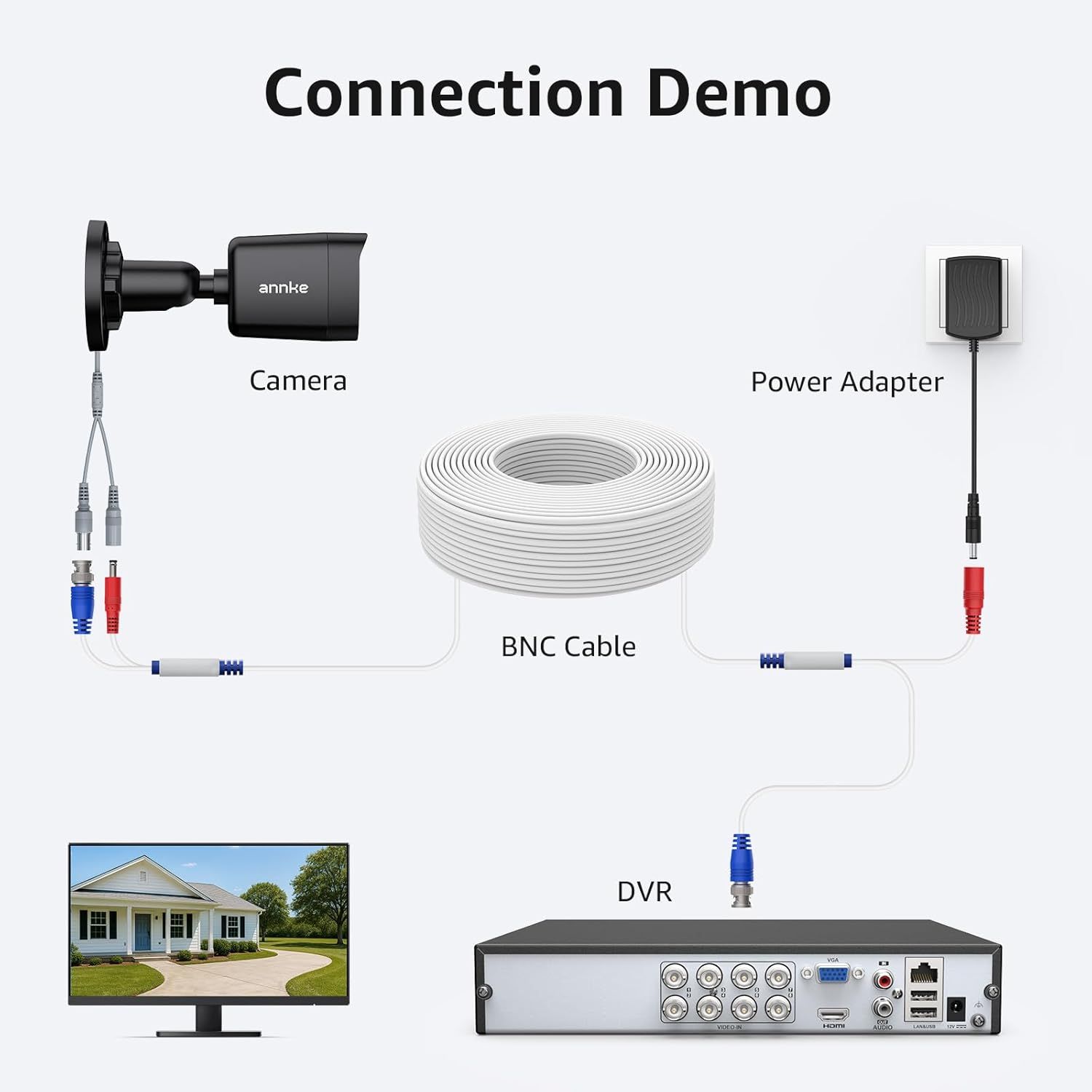
Demonstrates how to connect and set up the security camera system by showing the step-by-step wiring between the camera, BNC cable, power adapter, and DVR unit.
- Brand
- ANNKE
- Category
- Electronics › Security & Surveillance › Accessories › Surveillance Camera Cables
- Image type
- How to Use Images, Secondary Images
- Design focus
- Installation Setup; Connection Instructions
- Listing position
- Image 6
- Marketplace
- United States
- Best Sellers Rank
- #2 in Surveillance Camera Cables
- Full listing
- See all 9 images in order
- ASIN
- B00SY4V7T2
See your listing next to your competitors
Paste your Amazon link. We score every image and show what the top sellers do differently. Your first comparison is free.
What this image does at a glance
- Score
- 56 / 100 · Hard to read small
- Headline
- Connection Demo
- Headline height
- 4.4% of the image
- Headline contrast
- Lc 98
- Text on the image
- 4.0% of the image, 6 blocks
- Blurred to tile size
- headline no longer readable
Listing bullet points
- Smooth 5MP Transmission: Clear & smooth video stream; Pre-made BNC cable made of copper, lower resistivity & better electrical conductivity
- High-Performance Cables: ISET Srl certified security camera cables (with pure copper core), excellent ductility, low power & voltage consumption; Resistant to corrosion & oxidation
- Weatherproof & Fire Rated: The video cable fits every scenario, on the surface, in wall, between floors, buried under the ground, outdoors & indoors
- Universal Compatibility: Work with ANNKE & other brands' DVR camera systems, 960H/720p/960p/1080p/3MP/4MP/5MP, AHD/CVI/TVI (for cameras with 5.5*2.1 mm DC power connectors only)
- Complimentary BNC & RCA Connectors: The included BNC & RCA connectors can double the connection distance, and act as the interface converter
Similar how to use images in Electronics
 GEEKOM A7 Mini PC
 Sennehiser ACCENTUM Plus Wireless Headphones
 Sennehiser ACCENTUM Plus Wireless Headphones
 Sennehiser ACCENTUM Plus Wireless Headphones
 Sennheiser Consumer Audio Momentum 4 Wireless Headphones
 Sennheiser Consumer Audio Momentum 4 Wireless Headphones
 Sennheiser Consumer Audio Momentum 4 Wireless Headphones
 Sennehiser ACCENTUM Wireless Headphones
 Anker Adaptador hub USB-C
 Metal Switch Opener GPL 205G0 0.35oz
 Metal Switch Opener GPL 205G0 0.35oz
 RUNJRX
This image belongs to ANNKE and is shown for design research. Request removal.