REOLINK Smart 5MP 8CH Home Security Camera System: How to Use Images
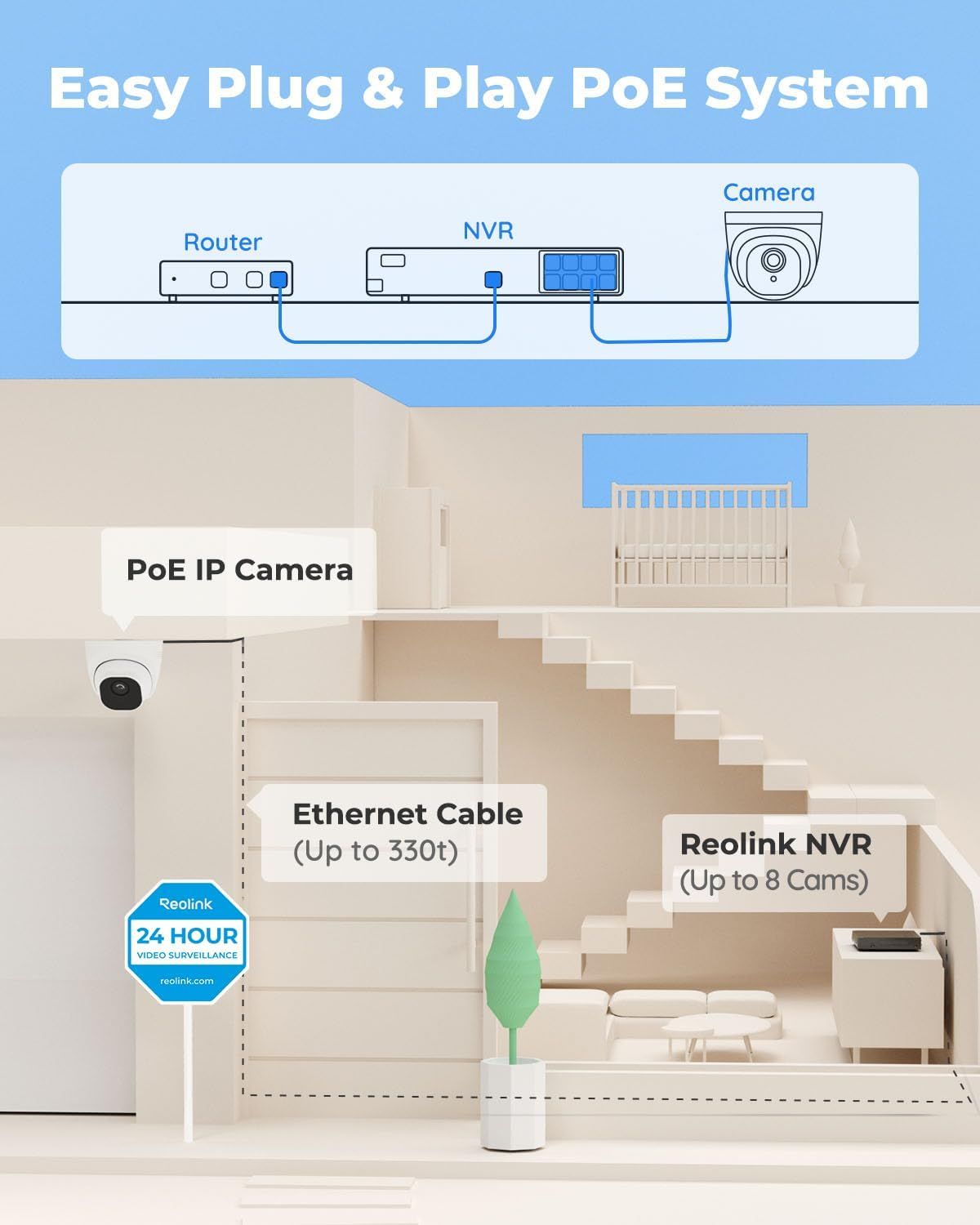
Demonstrates how to set up the PoE security camera system by showing the simple connection between router, NVR, and camera, reassuring shoppers that installation is straightforward and requires minimal technical expertise. Communicates the primary benefit of easy plug-and-play setup to reassure shoppers that the system is user-friendly and doesn't require professional installation.
- Brand
- REOLINK
- Category
- Electronics › Security & Surveillance › Surveillance Video Equipment › Surveillance NVR Kits
- Image type
- How to Use Images, Single Benefit Images, Secondary Images
- Design focus
- Easy Setup; Plug and Play Installation; Easy Installation; Plug and Play
- Listing position
- Image 5
- Marketplace
- United States
- Best Sellers Rank
- #2 in Surveillance NVR Kits
- Full listing
- See all 9 images in order
- ASIN
- B07H3QVZQ2
See your listing next to your competitors
Paste your Amazon link. We score every image and show what the top sellers do differently. Your first comparison is free.
What this image does at a glance
- Score
- 21 / 100 · Unreadable small
- Headline
- Easy Plug & Play PoE System
- Headline height
- 3.9% of the image
- Headline contrast
- Lc 38
- Text on the image
- 9.3% of the image, 13 blocks
- Blurred to tile size
- headline still readable
- lower text "Easy Plug & Play PoE Sys" is 2.5% of height, needs 5.5%
- headline contrast below APCA minimum (Lc 38)
- 14 separate text blocks
Listing bullet points
- CAPTURE CRIME FROM DETAILS: Discover potential crime has never been so easier with superior 5MP HD. With advanced IR lights, you can see up to 100ft in the dark, helping to protect your property and loved ones even at night.
- SMART PERSON/ANIMAL/VEHICLE DETECTION – Smart PoE IP cameras can identify people, animals, and vehicles, minimizing unwanted alerts triggered by bugs or leaves (please upgrade to the latest firmware version). Filter out true threats and get to know what happened simply by glancing at the lock…
- PLUG & PLAY: With everything needed, the poe security camera system can be easily installed even by yourself. Just hook all the poe cameras up with the NVR and you can enjoy your whole new security system day and night.
- HEAR THE EVIDENCE: Watch and also hear every detail of surroundings and make sure everything is under control. With the built-in microphone, you won’t miss any suspicious noise or conversation when the crisis arises with just one click to turn the function on.
- HDD Storage and Remote Playback – Including a pre-installed 2TB HDD, videos can be recorded and stored for ten days without overwriting occurring. Users can add one additional external 8TB HDD via the camera’s e-SATA port. With the free Reolink app, all videos can be played back through your smart…
Similar how to use images in Electronics
 GEEKOM A7 Mini PC
 Sennehiser ACCENTUM Plus Wireless Headphones
 Sennehiser ACCENTUM Plus Wireless Headphones
 Sennehiser ACCENTUM Plus Wireless Headphones
 Sennheiser Consumer Audio Momentum 4 Wireless Headphones
 Sennheiser Consumer Audio Momentum 4 Wireless Headphones
 Sennheiser Consumer Audio Momentum 4 Wireless Headphones
 Sennehiser ACCENTUM Wireless Headphones
 Anker Adaptador hub USB-C
 Metal Switch Opener GPL 205G0 0.35oz
 Metal Switch Opener GPL 205G0 0.35oz
 RUNJRX
This image belongs to REOLINK and is shown for design research. Request removal.