Blink Outdoor 4: How to Use Images
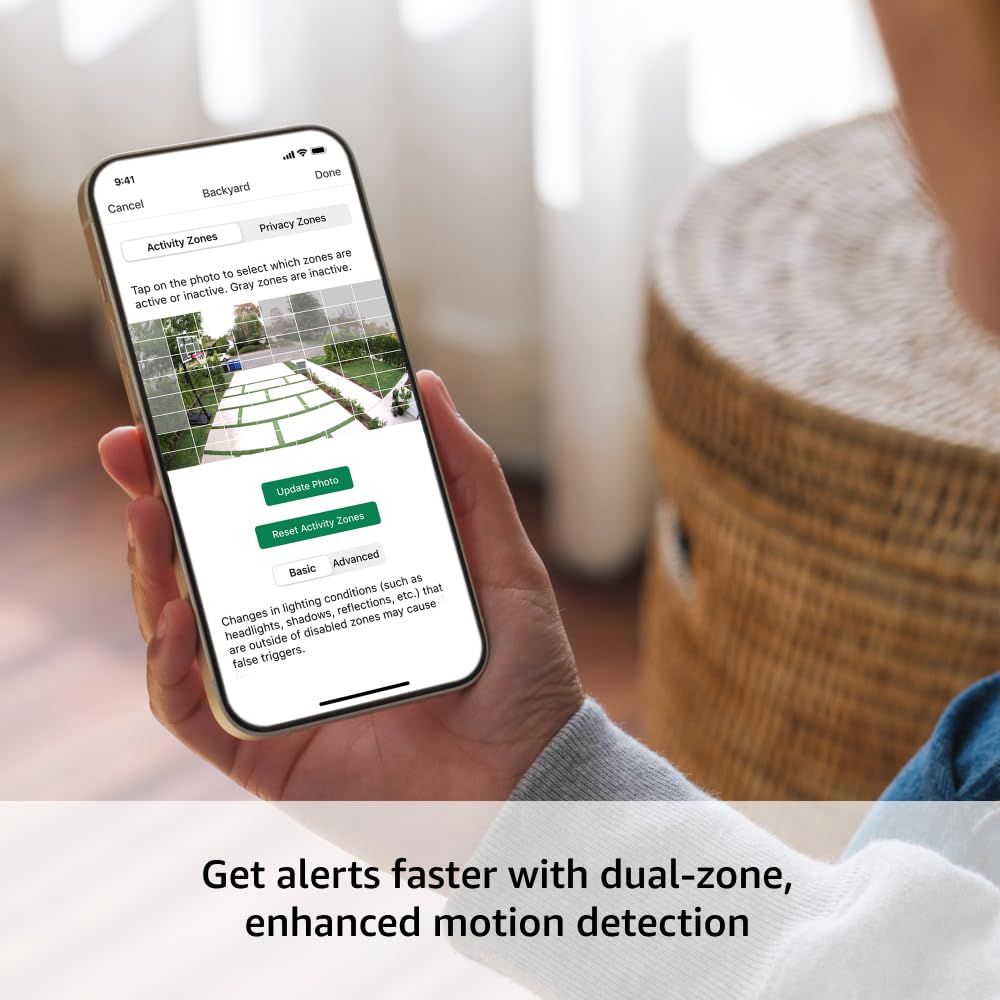
Demonstrates how to set up and configure activity zones and privacy zones through the mobile app interface, showing shoppers the ease of customizing motion detection areas. Highlights the dual-zone motion detection feature that enables faster alerts by allowing users to customize which areas trigger notifications.
- Brand
- Blink
- Image type
- How to Use Images, Single Benefit Images, Secondary Images
- Design focus
- Activity Zone Setup; Motion Detection Configuration; Dual-Zone Enhanced Motion Detection
- Listing position
- Image 5
- Marketplace
- United States
- ASIN
- B0DHLQT3CG
See your listing next to your competitors
Paste your Amazon link. We score every image and show what the top sellers do differently. Your first comparison is free.
What this image does at a glance
- Score
- 36 / 100 · Unreadable small
- Headline
- headlights, shadows, reflections, etc.) that
- Headline height
- 6.6% of the image
- Headline contrast
- Lc 62
- Text on the image
- 12.9% of the image, 18 blocks
- Blurred to tile size
- headline no longer readable
Listing bullet points
- Outdoor 4 is our most affordable wireless smart security camera yet, offering up to two-year battery life for around-the-clock peace of mind. Local storage not included with Sync Module Core.
- See and speak from the Blink app — Experience 1080p HD live view, infrared night vision, and crisp two-way audio.
- Two-year battery life — Set up in minutes and get up to two years of power with the included AA Energizer lithium batteries and a Blink Sync Module Core.
- Enhanced motion detection — Be alerted to motion faster from your smartphone with dual-zone, enhanced motion detection.
- Person detection — Get alerts when a person is detected with embedded computer vision (CV) as part of an optional Blink Subscription Plan (sold separately).
- Save and share clips — While Sync Module Core doesn't offer local storage, securely store your footage in the cloud with a free 30-day trial of a Blink Subscription Plan. You can also back it up locally with a Sync Module XR and a MicroSD card or Sync Module 2 and USB flash drive (all sold…
- Works with Alexa — Connect to an Alexa-enabled device to engage multi-camera live view, arm and disarm your system, and more using your voice.
- Includes three Outdoor 4 cameras, one Sync Module Core, six AA Energizer lithium batteries, three mounting kits, one USB-C cable, and one power adapter.
Similar how to use images
 Syrup Dispenser for Coffee Bars
 3 Pack Oven Liners for Bottom of Oven
 Oven Liners for Bottom of Oven
 Oven Liners for Bottom of Oven
 CeraVe Hydrating Anti Dandruff Shampoo
 CeraVe Gentle Hydrating Shampoo with Hyaluronic Acid for Hair & Scalp
 CeraVe Hydrating Cream To Foam Cleanser
 CeraVe Retinol Serum for Face with Niacinamide & Hyaluronic Acid
 CeraVe Skin Brightening Vitamin C Serum for Face with Hyaluronic Acid
 CeraVe Skin Brightening Vitamin C Serum for Face with Hyaluronic Acid
 CeraVe Intensive Moisturizing Cream with Shea Butter for Dry Skin
 CeraVe Intensive Moisturizing Lotion
This image belongs to Blink and is shown for design research. Request removal.