4K Digital Camera with SD Card: How to Use Images
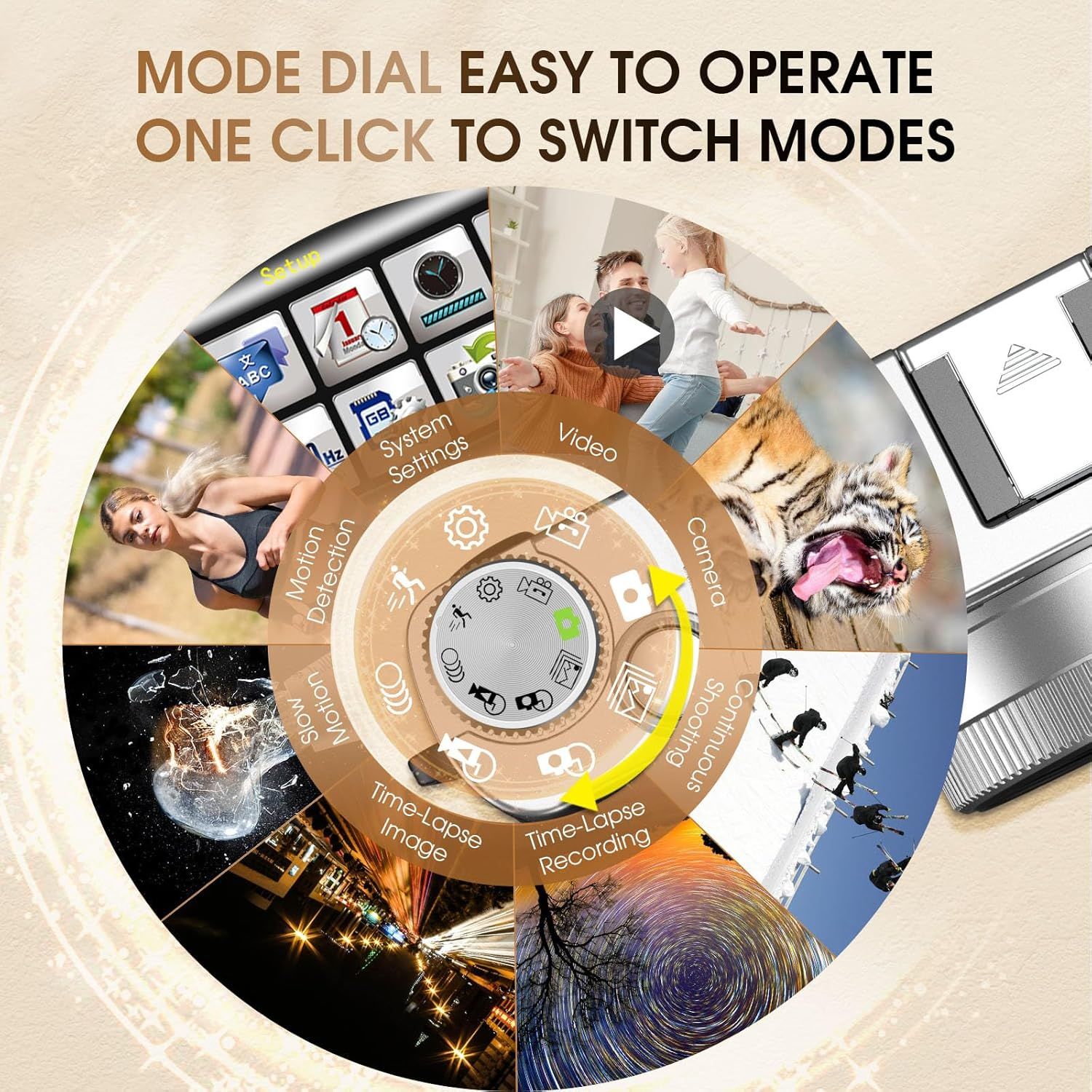
Demonstrates how to easily operate the camera's mode dial with a single click to switch between various shooting modes, reassuring shoppers that the device is user-friendly and versatile. Showcases the camera's versatility by displaying multiple shooting modes and use cases including video, motion detection, time-lapse, and various photography scenarios.
- Brand
- HICSHON
- Category
- Electronics › Camera & Photo › Digital Cameras › Point & Shoot Digital Cameras
- Image type
- How to Use Images, Use Case Images, Secondary Images
- Design focus
- Mode Dial Operation; One-Click Mode Switching; Multiple Shooting Modes; Motion Detection; Video; Camera; Time-Lapse; Continuous Shooting
- Listing position
- Image 4
- Marketplace
- United States
- Full listing
- See all 9 images in order
- ASIN
- B0CG1GGRK2
See your listing next to your competitors
Paste your Amazon link. We score every image and show what the top sellers do differently. Your first comparison is free.
What this image does at a glance
- Score
- 39 / 100 · Unreadable small
- Headline
- snonujuo
- Headline height
- 10.9% of the image
- Headline contrast
- Lc 42
- Text on the image
- 13.9% of the image, 18 blocks
- Blurred to tile size
- headline no longer readable
Listing bullet points
- 𝟒𝟖𝐌𝐏 𝐀𝐮𝐭𝐨𝐟𝐨𝐜𝐮𝐬 & 𝟒𝐊 𝐕𝐢𝐝𝐞𝐨 𝐂𝐚𝐦𝐞𝐫𝐚: 48MP 4k digital camera adds autofocus (light press shutter) and 16x zoom, using advanced autofocus algorithms to easily capture high-definition blockbuster shots of both close-ups and distant views! The 4K video camera is equipped with…
- 𝐕𝐢𝐞𝐰𝐟𝐢𝐧𝐝𝐞𝐫 & 𝐅𝐥𝐚𝐬𝐡: 4K digital camera with viewfinder can reduce the impact of strong light on the eyes during shooting, helping beginners achieve professional composition. When you raise the camera to eye level, the viewfinder of this camera will activate automatically. The small…
- 𝐄𝐚𝐬𝐲 𝐭𝐨 𝐔𝐬𝐞 𝐃𝐢𝐚𝐥 & 𝐏𝐨𝐫𝐭𝐚𝐛𝐥𝐞 𝐓𝐫𝐚𝐯𝐞𝐥: The vlogging camera features a retro and stylish design with a top-mounted dial that allows for easy switching between different shooting modes. The small grip provides better stability during photography. This travel camera is compact…
- 𝐅𝐮𝐧 𝐅𝐞𝐚𝐭𝐮𝐫𝐞𝐬 & 𝐖𝐞𝐛𝐜𝐚𝐦: More fun photography features: beauty, 2/5/10s selfie, time stamp, filters, face/smile capture... Vlogging camera for YouTube can be used as a webcam. The time-lapse function allows you to capture short videos of sunrises or blossoms, slow-motion shooting of…
- 𝐓𝐫𝐚𝐧𝐬𝐦𝐢𝐬𝐬𝐢𝐨𝐧 & 𝐒𝐞𝐫𝐯𝐢𝐜𝐞: This point and shoot camera can be quickly connected to your computer via a Type-C cable and also comes with an HDMI cable for connecting to your TV, allowing you to easily reminisce about joyful moments with your family and friends. At the bottom, it can…
Similar how to use images in Electronics
 GEEKOM A7 Mini PC
 Sennehiser ACCENTUM Plus Wireless Headphones
 Sennehiser ACCENTUM Plus Wireless Headphones
 Sennehiser ACCENTUM Plus Wireless Headphones
 Sennheiser Consumer Audio Momentum 4 Wireless Headphones
 Sennheiser Consumer Audio Momentum 4 Wireless Headphones
 Sennheiser Consumer Audio Momentum 4 Wireless Headphones
 Sennehiser ACCENTUM Wireless Headphones
 Anker Adaptador hub USB-C
 Metal Switch Opener GPL 205G0 0.35oz
 Metal Switch Opener GPL 205G0 0.35oz
 RUNJRX
This image belongs to HICSHON and is shown for design research. Request removal.