Instant Camera: How to Use Images
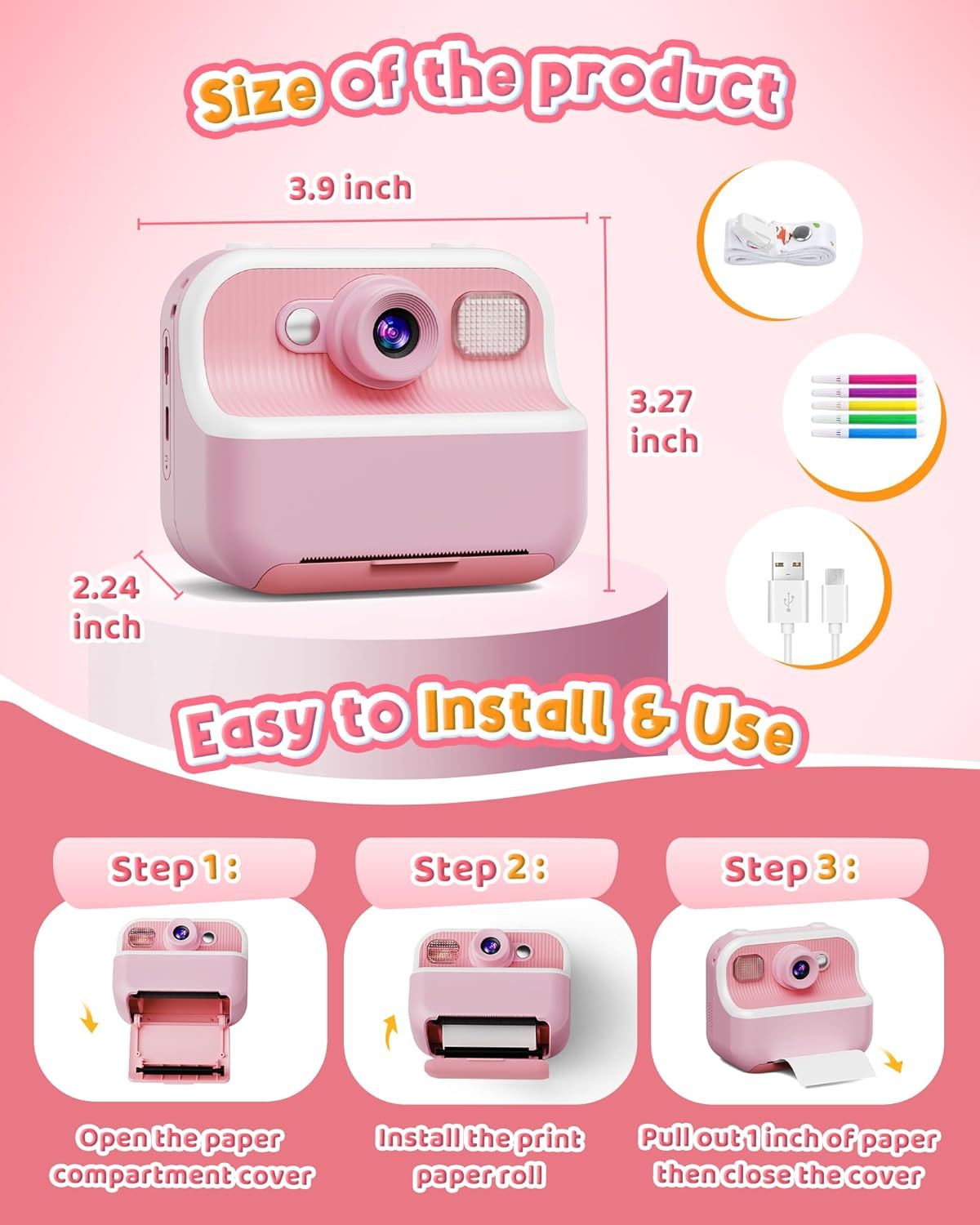
Communicates the exact physical dimensions of the product (3.9 x 3.27 x 2.24 inches) to help shoppers understand its compact size and portability. Provides clear step-by-step instructions on how to install and use the product, showing the 3-step process to load paper and begin printing.
- Brand
- DUDUDRAGON
- Category
- Electronics › Camera & Photo › Digital Cameras › Instant Cameras
- Image type
- How to Use Images, Dimension Images, Secondary Images
- Design focus
- Physical Dimensions; Installation Instructions; Setup Steps
- Listing position
- Image 8
- Marketplace
- United States
- Full listing
- See all 9 images in order
- ASIN
- B0DN15476J
See your listing next to your competitors
Paste your Amazon link. We score every image and show what the top sellers do differently. Your first comparison is free.
What this image does at a glance
- Score
- 6 / 100 · Unreadable small
- Headline
- Easy to Install G Use
- Headline height
- 7.8% of the image
- Headline contrast
- Lc 45
- Text on the image
- 19.0% of the image, 16 blocks
- Blurred to tile size
- headline no longer readable
Listing bullet points
- Children's Instant Print Camera: Capture fun experiences with dual front and rear cameras! Print black-and-white photos in just 1 second, while color images save to the 32GB SD card(Included). With 20 frames and 7 filters, this camera sparks creativity and transforms snapshots into cherished…
- All-in-One Kids Digital Camera: Perfect for young creators, this mini camera features instant printing, a 2.4-inch screen, and 1080P video recording. Enjoy 16x digital zoom, flash, time-lapse, continuous shooting, fun frames, games, and an MP3 player—perfect for capturing family fun
- Safety First, Adventure Ready: Crafted from high-quality, non-toxic materials and designed with shockproof protection, our camera ensures safety and durability for all your child’s adventures—giving parents peace of mind
- On-the-Go Power: With Type-C fast charging, this travel-friendly camera provides 4-5 hours of continuous use after a full charge. Each camera comes with a USB Type-C cable, handy lanyard, 32GB SD card, so kids can capture joyful moments anytime, anywhere
- The Ultimate Gift for Young Explorers: This multifunctional camera is the perfect birthday or holiday gift for kids ages 3-12. More than just a toy, it’s a creative tool that encourages exploration and memory-making without the worry of using your smartphone
Similar how to use images in Electronics
 GEEKOM A7 Mini PC
 Sennehiser ACCENTUM Plus Wireless Headphones
 Sennehiser ACCENTUM Plus Wireless Headphones
 Sennehiser ACCENTUM Plus Wireless Headphones
 Sennheiser Consumer Audio Momentum 4 Wireless Headphones
 Sennheiser Consumer Audio Momentum 4 Wireless Headphones
 Sennheiser Consumer Audio Momentum 4 Wireless Headphones
 Sennehiser ACCENTUM Wireless Headphones
 Anker Adaptador hub USB-C
 Metal Switch Opener GPL 205G0 0.35oz
 Metal Switch Opener GPL 205G0 0.35oz
 RUNJRX
This image belongs to DUDUDRAGON and is shown for design research. Request removal.