Remote Control for TikTok Scrolling Ring for iPhone: How to Use Images
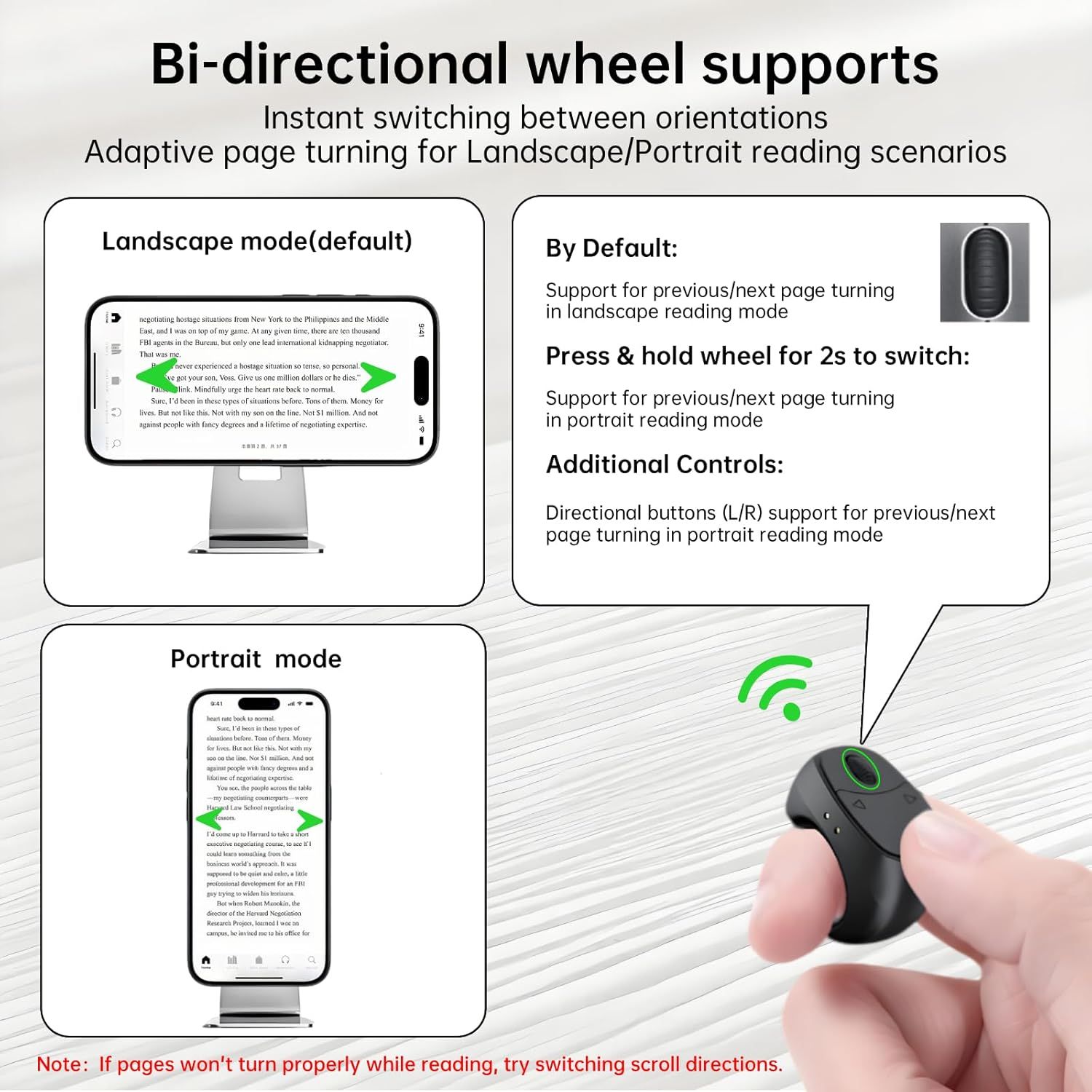
Explains how to use the bi-directional wheel feature to switch between landscape and portrait reading modes, including the press-and-hold gesture and directional button controls. Highlights multiple benefits of the wheel feature including instant orientation switching, adaptive page turning for different reading scenarios, and various control methods (wheel, buttons) for enhanced usability.
- Brand
- JierLottume
- Category
- Electronics › Camera & Photo › Accessories › Remote Controls
- Image type
- How to Use Images, Infographic Images, Secondary Images
- Design focus
- Bi-directional wheel switching; Adaptive page turning; Orientation controls; Bi-directional wheel support; Instant orientation switching; Adaptive page turning; Multiple control options
- Listing position
- Image 4
- Marketplace
- United States
- Best Sellers Rank
- #502 in Camera & Camcorder Remote Controls
- Full listing
- See all 9 images in order
- ASIN
- B0FC6VX7S2
See your listing next to your competitors
Paste your Amazon link. We score every image and show what the top sellers do differently. Your first comparison is free.
What this image does at a glance
- Score
- 25 / 100 · Unreadable small
- Headline
- Bi-directional wheel supports
- Headline height
- 3.8% of the image
- Headline contrast
- Lc 93
- Text on the image
- 15.6% of the image, 15 blocks
- Blurred to tile size
- headline no longer readable
- lower text "Adaptive page turning fo" is 1.6% of height, needs 5.5%
- headline unreadable at phone-tile blur
- 30 separate text blocks
Listing bullet points
- [𝐢𝐎𝐒 𝐒𝐄𝐓𝐔𝐏 𝐍𝐄𝐄𝐃𝐄𝐃: 𝟏𝟎 𝐒𝐄𝐂𝐎𝐍𝐃𝐒—𝐎𝐍𝐄-𝐓𝐈𝐌𝐄 𝐎𝐍𝐋𝐘!] Go to Settings > Accessibility > Zoom, then turn on "Zoom". Heads up: Zoom will magnify your entire screen. Double-tap with three fingers to get your screen back to normal
- [𝐓𝐢𝐤𝐓𝐨𝐤 𝐒𝐜𝐫𝐨𝐥𝐥𝐢𝐧𝐠 𝐑𝐢𝐧𝐠] Scroll vertically through TikTok, YouTube Shorts, and Reels (Instagram Shorts) so easily: Switch videos with the fast-scrolling wheel—no need to touch your screen! Additionally, you can pause/play, like videos, and adjust the volume directly from the…
- [𝐞𝐁𝐨𝐨𝐤 𝐚𝐩𝐩 𝐏𝐚𝐠𝐞 𝐓𝐮𝐫𝐧𝐞𝐫] Glide the wheel to turn pages effortlessly during bedtime reading or work breaks—supports both portrait and landscape modes. Works exclusively with Kindle, Apple Books, and Google Play Books on iOS/Android devices.Not compatible with e-readers (e.g.,…
- [𝐖𝐢𝐫𝐞𝐥𝐞𝐬𝐬 𝐂𝐚𝐦𝐞𝐫𝐚 𝐒𝐡𝐮𝐭𝐭𝐞𝐫 𝐑𝐞𝐦𝐨𝐭𝐞] This Bluetooth scrolling ring lets you easily capture photos and videos remotely—perfect for group photos, selfies, or hands-free vlogging. Press the ring’s circular button to take selfies and group photos; use the directional buttons to…
- [𝐌𝐮𝐬𝐢𝐜 𝐂𝐨𝐧𝐭𝐫𝐨𝐥 𝐑𝐢𝐧𝐠 & 𝐂𝐚𝐥𝐥 𝐀𝐧𝐬𝐰𝐞𝐫𝐢𝐧𝐠] Perfect for workouts—this Bluetooth ring lets you skip fumbling with your phone mid-move! Control Spotify, Apple Music, YouTube Music, and more: Play/pause, skip tracks, adjust volume, all right from your finger. Answer, hang up,…
- [𝐋𝐢𝐠𝐡𝐭𝐰𝐞𝐢𝐠𝐡𝐭 & 𝐋𝐨𝐧𝐠-𝐋𝐚𝐬𝐭𝐢𝐧𝐠] With a 19mm diameter, this ring features a lightweight design(only 8g ) that fits securely and comfortably on your finger. The charging case also acts as a phone stand and contains a 180mAh battery, in addition to the ring’s 30mAh battery,…
Similar how to use images in Electronics
 GEEKOM A7 Mini PC
 Sennehiser ACCENTUM Plus Wireless Headphones
 Sennehiser ACCENTUM Plus Wireless Headphones
 Sennehiser ACCENTUM Plus Wireless Headphones
 Sennheiser Consumer Audio Momentum 4 Wireless Headphones
 Sennheiser Consumer Audio Momentum 4 Wireless Headphones
 Sennheiser Consumer Audio Momentum 4 Wireless Headphones
 Sennehiser ACCENTUM Wireless Headphones
 Anker Adaptador hub USB-C
 Metal Switch Opener GPL 205G0 0.35oz
 Metal Switch Opener GPL 205G0 0.35oz
 RUNJRX
This image belongs to JierLottume and is shown for design research. Request removal.