Logitech M185 Wireless Mouse: How to Use Images
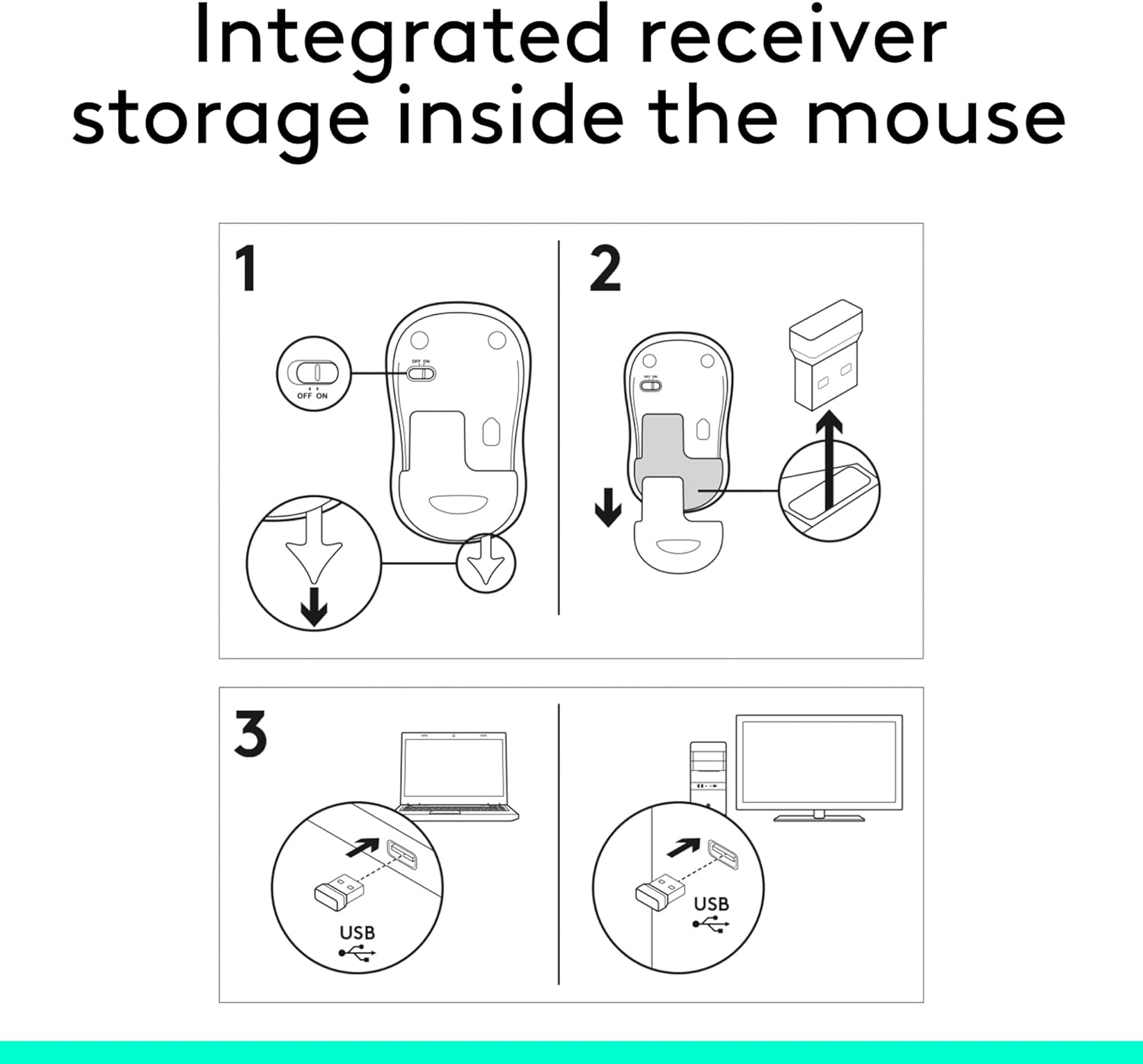
Explains how to set up and use the integrated receiver storage inside the mouse by connecting it wirelessly to a computer or TV.
- Brand
- Logitech
- Category
- Electronics › Computers & Accessories › Computer Accessories & Peripherals › Keyboards, Mice & Accessories › Mice
- Image type
- How to Use Images, Secondary Images
- Design focus
- Setup; Wireless Connection; Storage Integration
- Listing position
- Image 10
- Marketplace
- United States
- Best Sellers Rank
- #1 in Computer Mice
See your listing next to your competitors
Paste your Amazon link. We score every image and show what the top sellers do differently. Your first comparison is free.
What this image does at a glance
- Score
- 100 / 100 · Reads at a glance
- Headline
- 2
- Headline height
- 4.4% of the image
- Headline contrast
- Lc 104
- Text on the image
- 14.3% of the image, 5 blocks
- Blurred to tile size
- headline no longer readable
Listing bullet points
- Compact Mouse: With a comfortable and contoured shape, this Logitech ambidextrous wireless mouse feels great in either right or left hand and is far superior to a touchpad
- Durable and Reliable: This USB wireless mouse features a line-by-line scroll wheel, up to 1 year of battery life (2) thanks to a smart sleep mode function, and comes with the included AA battery
- Universal Compatibility: Your Logitech mouse works with your Windows PC, Mac, or laptop, so no matter what type of computer you own today or buy tomorrow your mouse will be compatible
- Plug and Play Simplicity: Just plug in the tiny nano USB receiver and start working in seconds with a strong, reliable connection to your wireless computer mouse up to 33 feet / 10 m (5)
- Better than touchpad: Get more done by adding M185 to your laptop; according to a recent study, laptop users who chose this mouse over a touchpad were 50% more productive (3) and worked 30% faster (4)
- Small and portable: The compact size and smooth cursor control make this mouse suitable for small to medium hands, tight workspaces or offices, and busy desktops
- The plastic parts in M185 include certified post consumer recycled plastic (77% for black and 49% for Charcoal/Grey, Black/Blue Glossy & Black/Red Glossy (6))
- Product carbon footprint: 3.97 kg CO2e
Similar how to use images in Electronics
 GEEKOM A7 Mini PC
 Sennehiser ACCENTUM Plus Wireless Headphones
 Sennehiser ACCENTUM Plus Wireless Headphones
 Sennehiser ACCENTUM Plus Wireless Headphones
 Sennheiser Consumer Audio Momentum 4 Wireless Headphones
 Sennheiser Consumer Audio Momentum 4 Wireless Headphones
 Sennheiser Consumer Audio Momentum 4 Wireless Headphones
 Sennehiser ACCENTUM Wireless Headphones
 Anker Adaptador hub USB-C
 Metal Switch Opener GPL 205G0 0.35oz
 Metal Switch Opener GPL 205G0 0.35oz
 RUNJRX
This image belongs to Logitech and is shown for design research. Request removal.